Separating an application into many small independently developed and deployed microservices that communicate over a thin layer (like http) has many benefits (see Fowler’s article). However, one of the main drawbacks of this architecture is the difficulty automating end-to-end tests for the application.
Newman’s Building Microservices asks two questions when end-to-end testing a microservices application:
- Which versions of the services should we test?
- Where are the tests written, to not to duplicate the effort for each service?
His solution is to have an external end-to-end test suite that can be run against many configurations of microservice versions. In this post, I present an implementation of Newman’s end-to-end microservices testing solution that uses the tool pmux and the continuous integration service TravisCI.
End-to-End Testing MicroServices
when [end-to-end tests] pass, you feel good: you have a high degree of confidence that the code being tested will work in production. Newman Building Microservices
If the benefit of end-to-end testing an application is confidence, then what are we confident in when testing a microservices application? We are confident all the different microservice versions in the system (which I call a configuration) work together correctly. The problem is that with many different configurations of those microwave versions, testing only one doesn’t give us confidence the others work.
For example, let’s look at the development of a basic microservices system where:
- service Av1 (service A version 1) and Bv1 are in production (this configuration is denoted as {Av1, Bv1})
- {Av1, Bv2} are in staging
- the team developing Av2 are testing it with Bv2 in the configuration {Av2, Bv2}
- the team developing Bv3 are testing it with Av1 in the configuration {Av1, Bv3}
In the near future of this system, any of the 6 possible configurations ({Av1, Bv1}, {Av1, Bv2}, {Av1, Bv3}, {Av2, Bv1}, {Av2, Bv2}, {Av2, Bv3}) of this application could be in production, but only 4 have ever been deployed and tested together ({Av1, Bv1}, {Av1, Bv2}, {Av1, Bv3}, {Av2, Bv2}). Now, imagine that Av2 is fast tracked to fix a critical bug. First, it would be deployed into staging where it would work because it has been tested with Bv2. If Av2 were deployed to production in the configuration {Av2, Bv1}, there could be problems as that configuration has not been tested before.
This is an exponential problem. If there are three services and each service has a three versions, then there are 27 (3³) combinations of services; four services with three versions is 81 combinations. A real world application may contain many services each with many versions, which can lead to thousands of potential configurations that could be tested.
It is not necessary to test every potential configuration of a microservice application. However, to be confident that the application works, you have to end-to-end test more than one.
A Basic Microservice Application
To demonstrate the tools of end-to-end testing microservice applications, I will use a “Hello World” microservices application where:
- Service A runs on port 8081 and returns a greeting generated by service A to a subject retrieved from service B
- Service B runs on port 8082 and returns a subject
Service Av1 looks like:
var http = require('http');``http.createServer(function (req, res) { var greeting = "Hello" http.get("http://localhost:8082", function(reply){ var who = "" reply.on('data', function(data) { who += data }) reply.on('end', function() { res.end(greeting + " " + who) }) }) }).listen(8081);
So in Av1 the greeting is “Hello” and in Av2 the greeting changes to “Go Away”.
Service Bv1 looks like:
var http = require('http');``http.createServer(function (req, res) { res.end('World'); }).listen(8082);
So in Bv1 “World” is returned, where in Bv2 it changes to “Alice”, and in Bv3 changes to “Bob”.
You can check out the code at:
Each of the service versions is tagged with v1, v2, v3.
To start these services you will need node.js installed, then just run node service.js.
Basic End-to-End Tests with Mocha and Chai
The microservice tests are written in node using the test runner Mocha and assertions library Chai. I have previously written about using these, if you are unfamiliar with them.
These microservices tests are not in the same repository as either of the services, they are in their own repository here).
There is only one test that calls service A to make sure the returned value is valid:
var chai = require('chai') var expect = chai.expect``var bluebird = require('bluebird') bluebird.Promise.longStackTraces(); var needle = bluebird.promisifyAll(require('needle'))``var valid_responses = [ "Hello World", "Hello Alice", "Go Away Alice", "Go Away Bob" ]``describe('service A', function(){ it('should return a valid response', function(){ return needle.getAsync("http://localhost:8081") .spread( function(res, body){ expect(valid_responses).to.contain(body.toString()) }) }) })
This test uses the bluebird promises library and needle to simplify the http request to service A and the chai expect function to make sure the response is valid.
In the test I define only four valid responses “Hello World”, “Hello Alice”, “Go Away Alice” and “Go Away Bob”. Given the different service versions, only the configurations {Av1,Bv1}, {Av1,Bv2}, {Av2,Bv2}, {Av2,Bv3} are valid.
pmux
To automatically test a microservice application, we need to start it with the versions of services we want. For this task we use pmux, which takes a node script defining the commands necessary to initialise and start a microservice application and executes them inside of a tmux session.
The pmux file microservice_configuration.js is used to setup our microservices application:
var microservices_directory = "services_dir" var Arepo="https://github.com/grahamjenson/microservice_A" var Brepo="https://github.com/grahamjenson/microservice_B"``var Aversion = process.env.SERVICE_A_VERSION var Bversion = process.env.SERVICE_B_VERSION``var configuration = { "name": "microservices", "pre_commands": [ "rm -rf " + microservices_directory, "mkdir " + microservices_directory ], "windows": { "serviceA": { "commands": [ "git clone " + Arepo + " -b " + Aversion, "cd microservice_A", "node service.js" ], "dir" : microservices_directory }, "serviceB": { "commands": [ "git clone " + Brepo + " -b " + Bversion, "cd microservice_B", "node service.js" ], "dir" : microservices_directory } } }``module.exports = configuration
This file will:
- execute the pre_commands list by deleting then making a services directory
- create two tmux windows in the service directory, one for each service
- each window will then use git clone to fetch a version of the service which is specified by the environment variables SERVICE_A_VERSION and SERVICE_B_VERSION
- each service window will then cd into their service directory and start the service with node service.js
If we wanted to test the configuration {Av1, Bv1} we would
- first install pmux with npm install -g pmux
- Set the versions of the services to test with export SERVICE_A_VERSION=v1 SERVICE_B_VERSION=v1
- start the tmux session with pmux microservice_configuration.js
- finally run the tests with mocha
Note: you can attach to the tmux session using tmux attach -t microservices
TravisCI
TravisCI is a continuous integration and testing service. It has nice features like being able to execute simultaneous tests runs using various environments. TravisCI is also free for open source projects, and it integrates automatically with github to run your tests on every git push. The way to tell TravisCI to run your tests is by using a .travis.yml file. The .travis.yml file for our microservices tests is:
`language: node_js
node_js:
- “0.12”``env:
- SERVICE_A_VERSION=v1 SERVICE_B_VERSION=v1
- SERVICE_A_VERSION=v1 SERVICE_B_VERSION=v2
- SERVICE_A_VERSION=v1 SERVICE_B_VERSION=v3
- SERVICE_A_VERSION=v2 SERVICE_B_VERSION=v1
- SERVICE_A_VERSION=v2 SERVICE_B_VERSION=v2
- SERVICE_A_VERSION=v2 SERVICE_B_VERSION=v3``install:
- sudo apt-get update
- sudo apt-get install -y git-core
- sudo apt-get install -y tmux
- npm install -g pmux
- npm install``script:
- pmux microservice_configuration.js -v
- sleep 2
- mocha``In this file:`
- node 0.12 is defined as the language
- the configurations to test are defined by the env key
- the required tools (git, tmux and pmux) are installed in the install key
- how to run the tests is described in the script key, where the pmux configuration is started, it sleeps for two seconds for the services to start, then we run the tests with mocha
After a git push to the repository TravisCI will trigger the test suite to run, and the output will look like this:
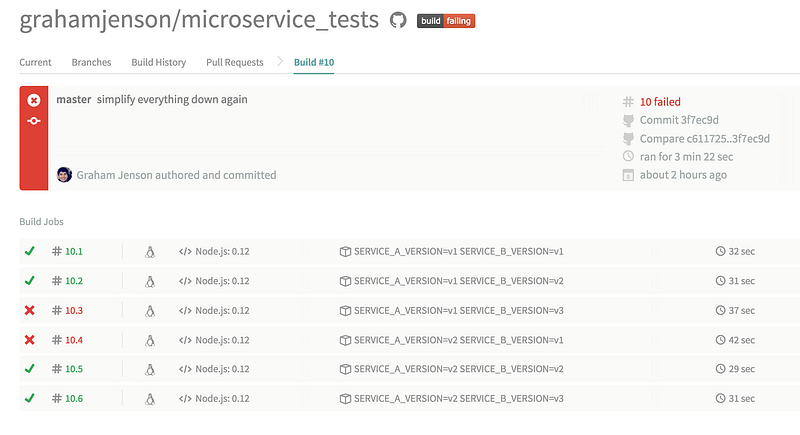
This shows us exactly what we needed to know, which microservice configurations pass the tests and which fail. Now we can make sure that the failing configurations never make it to production.
Conclusions
Many developers see microservices as the direction that large-scale web development is moving, so exploring ways to test and validate these applications is very important. Using pmux and TravisCI to execute end-to-end tests on the microservices applications I am helping to write gives me confidence they are working, and I hope this method can do the same for you.
References