
 Zion National Park’s amazing geology
The goal of the infrastructure team at Coinbase is to provide self-service tooling to our engineers to empower them to rapidly develop, monitor, and optimize services with low risk. With this mission in mind, we are currently in the process of building a workflow for creating and managing our codified infrastructure resources that looks like:
- Pull Request: an engineer submits a pull request to a repository with a new codified resource they want.
- Validation: the new resource is automatically validated and follows our company standards for naming, tagging, and security.
- Plan and Review: a plan describing the actions needed to be taken to apply a change is presented alongside the code change to be reviewed by an infrastructure team member.
- Merge then Apply: if the plan is good, then the pull request can be merged and automatically applied to the cloud.
This workflow manages our codified infrastructure the same way we manage our code with GitHub flow; i.e. open a pull request, ensure the change is valid with tests, merge the change into the master branch, then apply the changes to the necessary environments. The main idea of this workflow is to improve collaboration between the infrastructure and engineering teams. This will also speed up the development and deployment of resources, and make sure we deliver what is actually needed.
To decrease the learning curve, we want to standardize on a single tool to codify our resources. In the past, we have used a mixture of tools like CloudFormation, our open source tool Demeter, and Terraform. After looking at a number of tools, we found Terraform provides the most features our workflow requires: description of existing resources, easy definition and planning, support for variety of resources. However, using Terraform was difficult for a variety of reasons: lack of custom validations, coarse abstractions creating a lot of copy/paste code, and difficulties managing state.
To reuse as much of Terraform’s functionality as possible, we decided to build a thin wrapper around it that fits our desired workflow better. The tool we built is GeoEngineer __ (Geo for short): it provides a Ruby DSL (similar to Terraform’s) to codify resources, and a command line tool geo to plan and execute changes. This post describes how we use Geo at Coinbase to support this workflow that treats our infrastructure resources like code.
Pull Request
The most difficult requirement to implementing our workflow is that any engineer at Coinbase should be able to submit a pull request that codifies a new resource or change an already codified resource. This means the workflow requires a short learning curve for engineers who might not be familiar with the details of AWS or Terraform. GeoEngineer provides a familiar programming environment (a Ruby DSL) which has branching, functions, and variables, allowing to abstract away details with reusable templates, helper functions, and projects. For example, we use templates to describe resources in patterns like our internal_elb template that codifies an Elastic Load Balancer (ELB) for internal use, a security group for the ELB, and a security group for EC2 instances attached to the ELB:
project.from_template('internal_elb', 'api', { listeners: [{ in: 443, out: 8080 }] })
The DSL also supports helper functions to define smaller patterns inside resources, e.g. the function all_egress_everywhere creates a typical egress for a security group:
def all_egress_everywhere egress { from_port 0 to_port 0 protocol '-1' cidr_blocks ['0.0.0.0/0'] } end``project.resource('aws_security_group', 'ec2_default') { all_egress_everywhere }
You may have noticed above that resources are defined on a project which Geo uses to group related resources together, e.g. a project definition:
# ./projects/coinbase/foo.rb project = project('coinbase', 'foo') { environments 'staging', 'production' tags { ProjectName 'coinbase/foo' slack_channel 'foo' monitor 'true' } }
At Coinbase, we have one project per file and organize the files into organization folders (e.g. projects/<org>/<name>.rb) to make it easy to find where a resource should be codified. Projects can be applied to many environments, typically a project is developed in the ‘staging’ environment then applied to ‘production’ when it is ready. Optional project tags are applied to all sub resources to make identifying resources for accounting, alerting and debugging very easy.
The abstractions that GeoEngineer provides are mainly to shorten the learning curve, and they also have the benefits of removing large portions of copy and paste code. We are seeing about 80% less lines of Geo code v.s. the generated Terraform.
Without abstraction __ the __ Geo DSL is still very similar to Terraform, e.g.
# Terraform Security Group resource "aws_security_group" "allow_all" { name = "allow_all" ingress { from_port = 0 to_port = 0 protocol = "-1" cidr_blocks = ["0.0.0.0/0"] } }``# GeoEngineer Security Group project.resource("aws_security_group", "allow_all") { name "allow_all" ingress { from_port 0 to_port 0 protocol "-1" cidr_blocks ["0.0.0.0/0"] } }
This is so we can reuse Terraform’s great documentation with examples and easily keep up with its quickly increasing feature set.
Validation
Treating codified resources like code means we need tests to:
- Ensure the validity of the code and enforce standards, e.g. code style, security, and tagging.
- Provide helpful feedback if a proposed change does not satisfy some validations.
- Avoid any massive failure like accidentally deleting all resources, or as Google calls it “Automation: Enabling Failure at Scale”.
GeoEngineer has many inbuilt validations, but it also allows custom validations to ensure that resources are correct for your particular organization. At Coinbase, security is our highest priority. As a result, we are constantly implementing security standards as Geo validations. However, each organization will have their own priorities and standards for resources. For example, at Coinbase we require all resources be tagged with the name of their project:
class GeoEngineer::Resource validate -> { validate_has_tag(:ProjectName) if support_tags? } end
If a resource does not contain a ProjectName tag , then Geo will raise an error:
$ geo plan ERROR: ProjectName attribute on subresource "tag" is nil for resource "aws_security_group.ec2_foo" Total Errors 1
The canonical AWS way of accomplishing a similar outcome would be with AWS Config. However, Geo will fail much earlier before any resources are created, and its validations are defined with much more control and less complexity.
We have also added validations on the geo CLI, e.g. we can ensure that geo apply is only ever run on the master branch:
require 'git' class GeoEngineer::Environment before :apply, -> { g = Git.open('.') throw 'Not on master!' if g.lib.branch_current != 'master' } end
GeoEngineer will run these validations on every plan and apply command. It will output the errors it finds and will not execute unless there are 0 errors. This is part of our team’s ‘low-risk’ mission, to provide a safety net to experiment, refactor, and learn with the knowledge that nothing bad can happen.
Plan and Review
To ensure changes in the codified resources accurately reflect what they will actually change, we built a tool called mars. It receives GitHub webhooks and returns the result of the corresponding geo plan as a comment on pull requests:
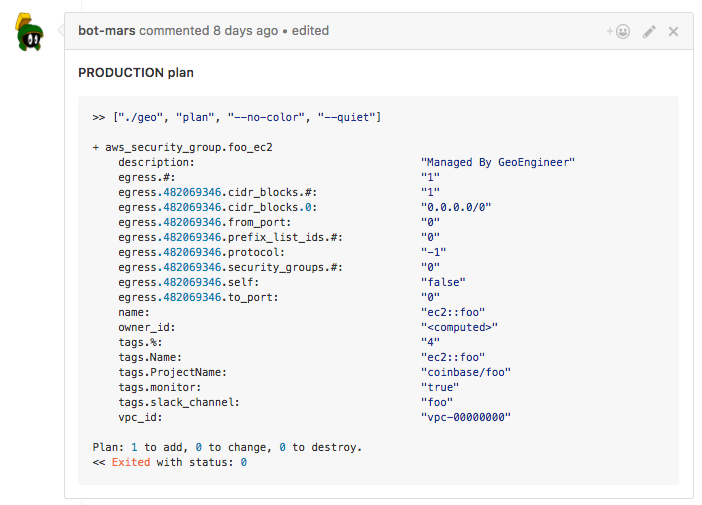 GitHub comment made by our mars bot
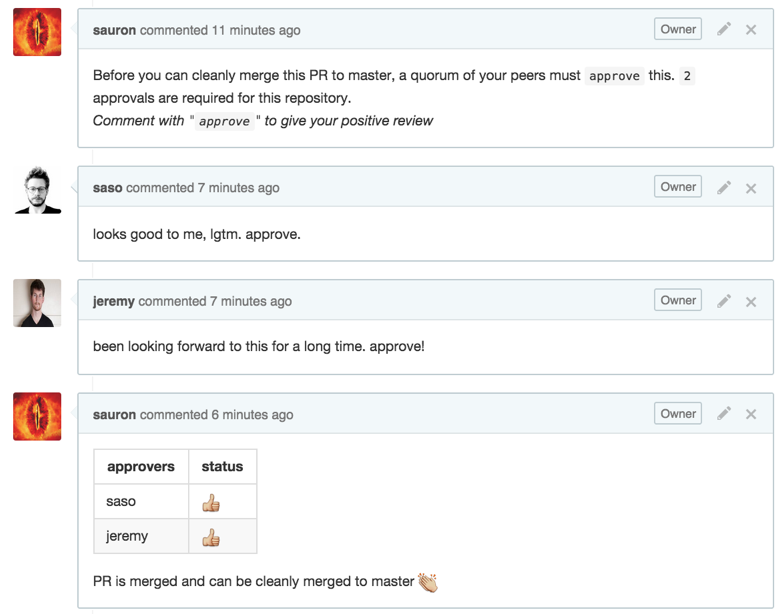
This plan and the corresponding code changes are then reviewed using our consensus-based review system. When a developer adds a comment that indicates a positive review of the pull request, another bot called sauron will then allow this pull request to be merged:
Merge then Apply
We block merging to master using GitHub’s branch protection until the pull request has generated a plan, passed all validations, and been positively reviewed by an infrastructure team member.
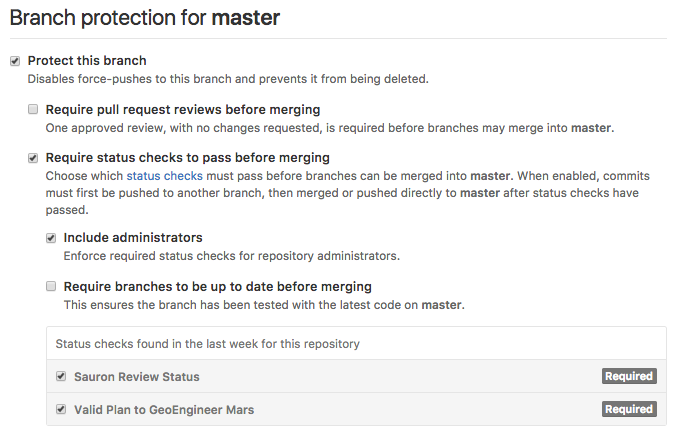 GitHub setting to make sure code changes are reviewed and valid
These checks are to ensure that there are no surprises when the changes are applied. If a merged pull request has mistakes or causes a failure, we go back to step 1 by creating a new pull request to fix the issue as well as adding a new validation to make sure the issue doesn’t occur in the future. Better validations improve our workflow and increase our trust merged code will not contain any errors.
In the future, we want to implement a service like mars that would automatically run geo apply on merges to the master branch and add the changes to the cloud. This is a significant step towards automation as it removes the last direct interaction between an engineer and the cloud. There are many challenges with automatically applying changes, including security of the workflow and ensuring the changes will not lead to any kind of significant failure. This service would help realize the ‘self-service’ mission of our infrastructure team.
What’s Next?
Treating our codified resources like code has opened up a number of possible future projects. One such project is to add semantics to GeoEngineer resources, e.g. security group and an Elastic Load Balancer understand what they are and their relation to one another. We hope these semantics can help provide better validations to ensure that resources behave as expected.
Another project would be improving Geo’s graph implementation. Currently, it takes the resources and abstractions (like project) and visualizes their relationships:
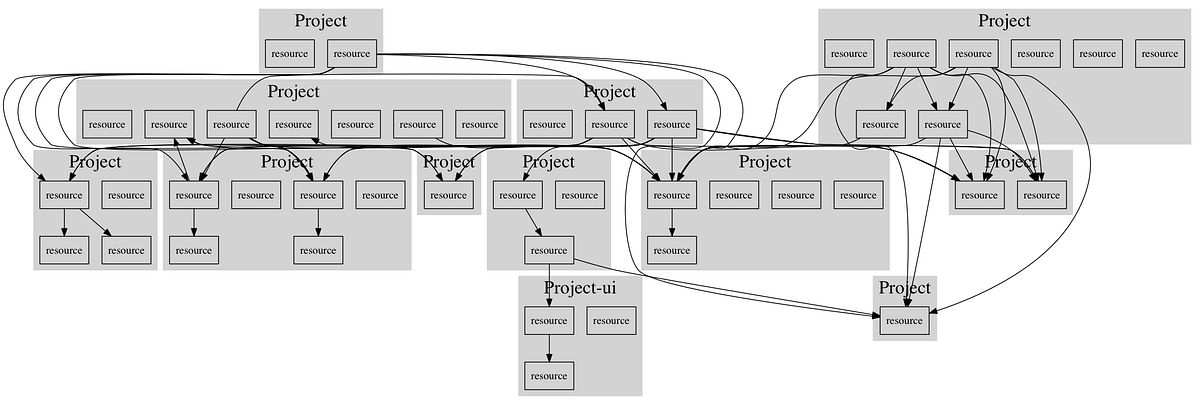 (Anonymized) Graph of related projects and resources generated by
 geo graph
An improved graph would be useful for management and security by making it easier to see what is happening (or could happen) in the cloud.
GeoEngineer’s plan command currently presents the plan directly from Terraform. This could be improved significantly, especially for resources like security groups and IAM policies where one small change can result in very large plans. Better presented plans could highlight the actual changes being requested and make it easier to review for the engineers.
Another goal of the team is contributing features from GeoEngineer back to Terraform. Ultimately we would like to use pure Terraform in this workflow, and Geo is trying to stay thin enough so that this could be accomplished easily in the future.
This workflow was built to treat our “infrastructure as code” with the same recommended coding practices of our other code. We hope that this will make it easier to develop and maintain our cloud in the long run.
Finally, all contributions to GeoEngineer like feature requests, bugs, testing are always appreciated.
Resources
- GeoEngineer Source
- GeoEngineer Documentation
- Short video about GeoEngineer at AWS re:Invent https://www.youtube.com/watch?v=Pp12ElEgKGI