When writing blog posts I have a few requirements:
- Offline: I travel and commute which means that I have no internet frequently which is a great time to write distraction free.
- Easy Publishing: I moved all my blogging to medium because I spent far too much time doing things on the blog that were not writing.
- Syncing: I like to write on my laptop, but sometimes it is more convenient on my phone, like when I am waiting for a train.
- Formatting: I like Markdown, Medium doesn’t use markdown. This is my biggest issue with Medium. Typically I will write a post in Markdown then manually convert it to Medium which is super annoying.Previously I have used Evernote which is great offline and syncing, but it has a different format to both medium and markdown making which makes it difficult to publish with.
I have also just used a plain text editor Sublime Text with GFM markdown plugin, then wrote content in Notes in iOS and moved it manually to my laptop. This is a lot of manual syncing, and once completed I still have to convert it to mediums formatting.
Recently, I have been using the Medium iOS app and the website to directly write and edit. Of course this is the obvious solution but it is impossible to do offline (for now).
This post is my first attempt at using the highly recommended IA Writer written on both the iOS and MacOS versions. I would typically would have just written a “Test Post”, but wanted to also write a bit of a review as well. Here are some tests:
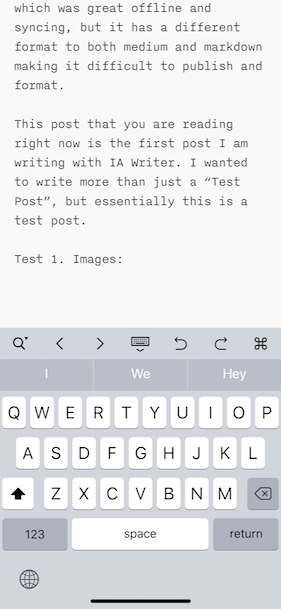
Test 1. Images
Screen shot:
Camera image:

Test 2: Headings
Heading 1
Heading 2
Heading 3
Test 3: quote and code
Inline code
Block code> This is a quote — anonymous
Test 4: linking
Test 5 Syncing
After installing the IA writer onto my MacBook which syncs to my iCloud, the posts I had written on iOS had auto synced over. Very easy.
Teat 6: Publishing
This post will have no changes made to it from the posted version from IA Writer.
Review
iOS review: IA Writer does a lot to help edit markdown on iOS, including a customizable keyboard which means I can remove options that I would never use. The inserting of images directly from the phone as that was always the hardest aspect of converting to Medium. The markdown viewer is super clean, I might use it to read README.md’s from Github.
OSX review: After syncing images from the iPhone they needed to be resaved as they were not the correct orientation. This was a minimal effort though, just right-click then “Open in Preview” save.
Syncing review: The posts sync quickly and auto update on one device if they have changed on another. If there is a conflict though, IA shows you the conflict and lets you chose which one to keep. There is no smart merging like Evernote has, which would be an awesome feature in the future.
Publishing review: This post was published without any changes being made in Medium. The biggest problem with publishing is that it can create a draft, but not update it. I would like to be able to overwrite a draft, but that could be dangerous.
Conclusion
IA Writer is a bit expensive, but unlike other editors it is not a subscription model. So, if you are going to use it for a year it is already cheaper than most competitors. I am going to continue to use IA Writer as I am enjoying its clean interface and easy workflow, hopefully they continue to add features to improve the already great experience.