On my quest towards building a GoLang Desktop application I found some useful frameworks, Lorca and Webview (which I wrote about in my previous post). These frameworks create a window which GoLang can inject HTML, CSS, and JavaScript to build the UI.
But I don’t want to write JavaScript(!) and deal with all the complexities that comes with it like npm, webpack, typescript… Fortunately, I can just compile GoLang to WebAssembly (WASM) and use that in place of JavaScript. WASM is a binary format that can be executed natively in most modern browsers. My previous post showed how to build a WASM web-app with the Bazel.
Also, using WASM in a desktop app (as opposed to a web app) dodges two of its main downsides:
- Large WASM binaries (especially from GoLang): these take a long time to send over the network increasing loading times. In a desktop app the binary isn’t transferred over the network, so less overhead.
- Browser incompatibility: Some WebAssembly methods are unavailable in browsers and older browsers are not supported at all. In a desktop app the “browser” is controlled (Chrome for Lorca and Safari for webview), so no compatibility issues.
Let’s get started and build the app.
The Main Desktop App
First, I want to sketch out the main function for the app:
func main() { // Create the Data URI of index.html url := fmt.Sprintf( "data:text/html,%s", url.PathEscape(assets.INDEX_HTML) )`` // Create Lorca UI ui, _ := lorca.New(url, "", 600, 200) defer ui.Close()`` // Create a JS function that returns the WASM binary in base64 ui.Bind("getWASM", func() string { return assets.WASM_BIN })`` // Initialize the wasm_exec.js script ui.Eval(assets.WASM_EXEC_JS)`` // Call the initial JS functions to load the WASM ui.Eval(assets.INIT_JS)`` <-ui.Done() }
Note: the core difference between with webview, is using _Init_ instead of _Eval_
This app will start a Chrome window then:
- load the webpage with HTML
assets.INDEX_HTML - define a function
getWASMthat is a promise ofassets.WASM_BIN, the WASM binary as a base64 encoded string - load the JS GoLang WASM library
assets.WASM_EXEC_JScopied from$(go env **GOROOT**)/misc/wasm/wasm_exec.js - load the JS initialization script
assets.INIT_JS
This is pretty simple example Lorca app, it is basically the demo example. The main complication is the assets package and how it can be created. This is where Bazel comes in.
Embedding Files in GoLang Binary using Bazel
Note: an easier way to do this was pointed out to me using the [_go_embed_data_](https://github.com/bazelbuild/rules_go/blob/fbbbfde2dff5072fe118b369a699d456ec756b0c/go/extras.rst#id3) rule, better to use that.
The assets package contains the HTML, JS and WASM files as string constants. There are GoLang tools like pkger or go-bindata to do this, but we can keep this simple with a Bazel rule in to_go_constant.bzl:
def to_go_constant(name, package, constant, file, base64 = False): pkgStr = '<(echo "package %s")' % package conStr = '<(echo "const %s string = \")’ % constant
suffix = ‘<(echo “`”)’
genGo = ‘cat %s %s - %s ’ % (pkgStr, conStr, suffix)if base64: printContents = 'cat $(SRCS) | base64' else: printContents = 'cat $(SRCS)'native.genrule(
name = name,
srcs = [file],
outs = [name + “.go”],
cmd = printContents + ’ | ’ + genGo + ‘> $@’
)`
This rule uses cat to take a file and output a .go file with the package and const defined. If base64=True then the file is base64 encoded.
An example of this rule in action is adding the assets.INDEX_HTML built from the file index.html:
load("//:to_go_constant.bzl", "to_go_constant")``to_go_constant( name = "index", constant = "INDEX_HTML", file = ":index.html", package = "assets", )
This takes the index.html file:
`
and creates the index.go file:
package assets const INDEX_HTML string =
index.go can be added to the go_library rule for the assets package:
go_library( name = "go_default_library", srcs = [ "assets.go", ":index.go", # keep ], importpath = "github.com/.../assets", )
Now the INDEX_HTML constant is in the assets package.
It is straight forward for most the other files, but a bit more complicated for the WASM binary data:
to_go_constant( name = "wasmbin", base64 = True, constant = "WASM_BIN", file = "//project/wasm", package = "assets", )
The file //project/wasm refers to the generated go_binary rule that compiles the WASM (as described below). base64 is also True so that the binary data can be encoded as a constant.
Note: There is one minor issue is the _wasm_exec.js_ file, it has a few _`’s in it that must be replaced._
The WASM part
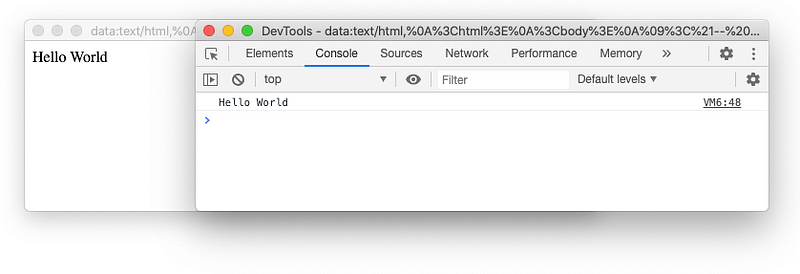
The WASM binary is the client-side GoLang application running in the browser. This example injects a Hello World <p> tag into the body:
package main``import ( "fmt" "syscall/js" )``func main() { fmt.Println("Hello World")`` document := js.Global().Get("document") p := document.Call("createElement", "p") p.Set("innerHTML", "Hello World") document.Get("body").Call("appendChild", p) }
The go_binary rule for this just needs goos="js" and goarch="wasm" for its output to be a WASM binary, e.g.:
go_binary( name = "wasm", embed = [":go_default_library"], goarch = "wasm", goos = "js", visibility = ["//visibility:public"], )
The output of this rule is used to above to create the WASM_BIN constant above.
Initializing the App
assets.INIT_JS is built from init.js:
loadWebASM = () => { const go = new Go(); getWASM().then( (b64) => { // Decode and convert to ArrayBuffer buf = Uint8Array.from(atob(b64), c => c.charCodeAt(0)).buffer return WebAssembly.instantiate(buf, go.importObject) }).then((result) => { go.run(result.instance); }).catch((err) => { console.error("loading wasm failed: " + err); }); }``loadWebASM()
This code takes the WASM_BIN promised by getWASM, then decodes and converts it to an ArrayBuffer. This buffer is passed to the [WebAssembly.instantiate](https://developer.mozilla.org/en-US/docs/Web/JavaScript/Reference/Global_Objects/WebAssembly/instantiate) function that compiles and initializes the application to an instance, which is then go.run. This is the only JavaScript needed.
Pure GoLang Desktop App
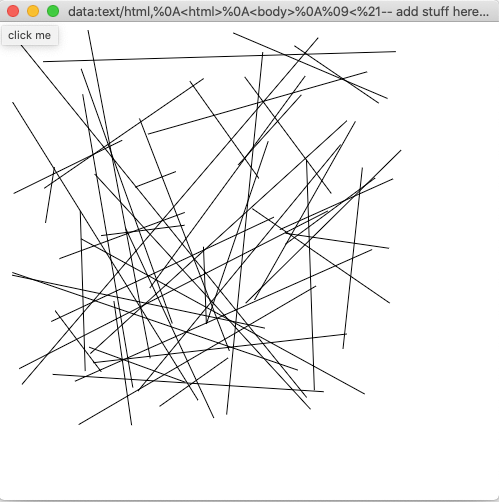
The above code is all that is needed to now write pure(-ish) GoLang desktop applications. This also makes it easy to convert other WASM apps to desktop applications, e.g. I converted the WASM app at https://github.com/olivewind/go-webassembly-canvas to a desktop application with minimal effort:
Conclusion
There are many libraries and tools written in GoLang that could use a nice user interface, e.g. terraform and docker (just off the top of my head). A web app does not fit their requirements very well since they are editing local files and talking to local daemons. The alternative is then to reimplement or bind their API and integrations to another language which is complicated, error prone and a lot of work. A method of building pure GoLang desktop applications makes a lot of sense for these kinds of tools.
This approach can pretty quickly create a distributable, single executable, desktop application with minimal external dependencies. An app that can reuse many GoLang libraries and tools that have already been built. I suppose the worst part of this approach is that it throws away years of development on JavaScript tools like React and Vue. But that just means I have to write more Go to reimplement them, so it isn’t that bad :)