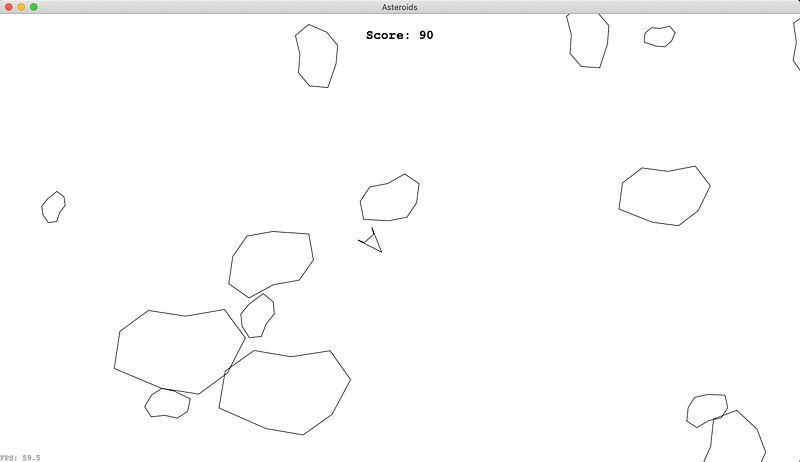
In my past few posts [1][2] I have written about building a desktop application using Golang with Lorca/Webview to run a WebAssembly (WASM) binary. Now, I want to actually try use these technologies in anger and produce a distributable desktop application.
I have chosen to make the game Asteroids (code here). It is reasonably complicated, fun and lets me play and learn more about Golangs [syscall/js](https://golang.org/pkg/syscall/js/) package and algorithms like Separating Axis Theorem (SAT) for collision detection. The goal is using Golang to build a single binary that can be downloaded onto different platforms (macOS, windows, linux) to play a fun game.
Code and releases are at https://github.com/grahamjenson/asteroids
PLAY THE GAME HERE
Reimplementing Solar Example
I first wanted to reimplement reimplement a simple example animation to make sure all the technologies play nice, and learn how to build a rendering loop in JS. I chose the Solar example from Mozilla, it draws the sun, earth and moon on a canvas, all orbiting around each other.
The first thing I did was abstract the Lorca and Webview code from my previous post into methods that take a common config:
func main() { config := &desktop.Config{ WasmBin: WASM_BIN, Width: 300, Height: 400, Title: "Solar", } desktop.CreateLorca(config) //desktop.CreateWebview(config) }
This makes is easier to switch between the two frameworks.
The WASM_BIN constant is created using the [go_embed_data](https://github.com/bazelbuild/rules_go/blob/master/go/extras.rst#go_embed_data) rule (thanks Ed Schouten). This exposes the WASM binary as a []byte that can be given to the frontend:
go_embed_data( name = "wasm_embed", src = "//games/solar/wasm", package = "main", string = False, var = "WASM_BIN", )
The actual Solar code is copied and converted from the example using the syscall/js package. The [gowasm-experiments](https://github.com/stdiopt/gowasm-experiments) (specifically “bouncy”) had some great examples to help.
The WASM app first gets the window and document, appends the canvas element, and gets the 2d context ctx to use for drawing:
window := js.Global() document := window.Get("document") canvas := document.Call("createElement", "canvas") document.Get("body").Call("appendChild", canvas) ctx := canvas.Call("getContext", "2d")
Then the sun, earth and moon images are loaded into <img> tags, e.g.:
sun := document.Call("createElement", "img") sun.Set("src", "[https://mdn.mozillademos.org/files/1456/Canvas_sun.png](https://mdn.mozillademos.org/files/1456/Canvas_sun.png)")
The core animation loop is created and started:
`var loop js.Func
loop = js.FuncOf(func(this js.Value, args []js.Value) interface{} {
ctx.Call(“clearRect”, 0, 0, 300, 300) // clear the Canvas
// Draw Everything here
window.Call(“requestAnimationFrame”, loop) // next frame
return nil
})
window.Call(“requestAnimationFrame”, loop) // start the loop`
[requestAnimationFrame](https://developer.mozilla.org/en-US/docs/Web/API/window/requestAnimationFrame) will call the loop function before repainting the browser window, syncing up to the browsers frame rate (which is usually 60fps) to our animations.
The loop js.Func first clears the canvas with clearRect, then calculates the image positions and draws them onto the canvas, e.g.:
t := time.Now() s := float64(t.Second()) ms := float64(t.Nanosecond()) / 1000000.0 tau := (2.0 * math.Pi)``ctx.Call("rotate", (tau/60.0)*s+(tau/60000.0)*ms) ctx.Call("translate", 105, 0) ctx.Call("drawImage", earth, -12, -12) ...
This creates the application:
The Mozilla Solar example reimplemented in Golang rendered using Lorca
Creating this in Golang and building with Bazel was a pretty nice development loop. The final binary is about 9Mb, pretty large compared to what it does. But, the amount of code was tiny for such a satisfying animation.
Canvas Context Wrapper
One of the annoying things I found while converting was calling the context with ctx.Call. If the method is misspelled it can crash the WASM app. To make this a bit safer and more Go-ish I wrote a quick wrapper around ctx:
type Context2D struct { JS *js.Value }``func NewContext2D(canvas js.Value) *Context2D { ctx := canvas.Call("getContext", "2d") return &Context2D{JS: &ctx} }``func (ctx *Context2D) ClearRect(x, y, width, height int) { ctx.JS.Call("clearRect", x, y, width, height) }``...
Now the above animation code is much cleaner, looking like:
ctx.Rotate((tau/60.0)*s+(tau/60000.0)*ms) ctx.Translate(105, 0) ctx.DrawImage(earth, -12, -12)#### Asteroids
To build an asteroids game the Lorca, WebView, WASM and game loop code are basically the same as the Solar app. The parts that are different and interesting to me is the vector graphics engine, the collision detection, and the game logic.
2D Vectors and Matrix Manipulation
8 years ago I wrote a small ruby library called [pathby](https://github.com/grahamjenson/pathby) that created, manipulated and rendered Bezier curves. I learnt from writing this library about the different matrix transformations like rotation, translation, and scaling. These are the core of the vector engine.
In my Golang vector library I define:
type Vector []float64 type Matrix []Vector type Polygon { Matrix }
To represent translation, rotation and scaling our Matrix needs to be 3x3. Since the matrix is 3x3 the Vectors must all be 3x1. Given we know the sizes of our matrices and vectors, their operations are pretty straight forward (if tedious) to implement and test. I didn’t focus on making their implementations super optimal though, Since “asteroids” was released in 1979, I figure I can trade some performance for cleaner code at the moment.
The Polygon is a 3xn matrix, a list of vectors where each vector is a point. It may have require further attributes so keeping it a struct is useful. This is the core struct used to render the game as vectors and matrix are hidden from the end app.
The polygon has all the transformation methods, the difference is they are all performed around the centroid of the polygon.
The RenderPolygon method can be used to render the polygon to the canvas:
func RenderPolygon(ctx *canvas.Context2D, s *Polygon) { ctx.BeginPath() first := true var firstPoint vector2d.Vector for _, v := range s.Matrix { if first { ctx.MoveTo(v[0], v[1]) first = false firstPoint = v } else { ctx.LineTo(v[0], v[1]) } } ctx.LineTo(firstPoint[0], firstPoint[1]) //close ctx.Stroke() }
This method assumes the polygon is closed.
Separating Axis Theorem
The most interesting part of this project was implementing the Separating Axis Theorem. The core idea is:
Two convex objects do not overlap if there exists an axis onto which the two objects’ projections do not overlap.
My intuitive understanding of this is:
if you can place a light anywhere such that the objects shadows have a gap between them, then they are not connected.
This isn’t perfect but it helps me see how the algorithm is implemented. For example, checking every single location for the light is impractical, really you only need to light up the places where there might be a gap, parallel to the objects edges. If the light is parallel to the edge then the shadow is perpendicular (normal )to it.
So, we need to project the objects onto the normals of each edge, and look for any gaps between the projections. This looks like the algorithm:
func (p1 *Polygon) SAT(p2 *Polygon) bool { for _, e := range p1.Edges() { if !checkNormal(p1, p2, e.Normal) { return false } } for _, e := range p2.Edges() { if !checkNormal(p1, p2, e.Normal) { return false } } return true }``func checkNormal(a, b *Polygon, normal Vector) bool { minA, maxA := a.flattenPointsOn(normal) minB, maxB := b.flattenPointsOn(normal) // Either |---|--|---| // 1. b---b a---a // a > b // 2. a---a b---b // b > a if minA > maxB || minB > maxA { return false } return true }
This algorithm will return if an object is colliding or not. We can get much more information than that. Since we know the projections of each edge (minA, maxA, minB, maxB) we can also tell:
- if
ais insideb, or vice-versa, - how much they overlap
- what vector needs to be added
ato stop colliding withb.
That is, if the objects are colliding we can tell if:
// Either |---|--|---| // a---b--a---b // B is greater than A // a---b--b---a // B is inside A // b---a--b---a // A is greater than B // b---a--a---b // A is inside B
So having the checkNormal function also return the vector of collision, the size of the projection overlap, and whether one object is inside the other will let us calculate these values for the two colliding objects. For example, if we wanted to have two objects feel “solid”, they must never overlap so on a collision we just move the object by vector*overlap.
I looked at many SAT implementations, jriecken/sat-js was really helpful.
Game Logic
So now we have a vector graphics library and collision detection. The final part is actually implementing asteroids. The game loop looks like:
game.Update(dt, pressedButtons) ctx.ClearRect(0, 0, width, height) // clear canvas game.Render(ctx)
JS does not handle multiple pressed buttons, and I want to be able to fire and turn left at the same time. So we implement pressedButtons by adding all buttons that are down to a map and removing them when they are up:
pressedButtons := map[int]bool{}``window.Call( "addEventListener", "keyup", js.FuncOf(func(this js.Value, args []js.Value) interface{} { e := args[0] e.Call("preventDefault") pressedButtons[e.Get("keyCode").Int()] = false return nil }))``window.Call( "addEventListener", "keydown", js.FuncOf(func(this js.Value, args []js.Value) interface{} { e := args[0] e.Call("preventDefault") pressedButtons[e.Get("keyCode").Int()] = true return nil }))
dt is calculated as the time since the last rendered frame. This lets the game logic not be tied to the frame rate.
The core game struct looks like:
type Game struct { asteroids []*Asteroid ship *Ship ... }
The ship and the asteroids have very similar properties, the main difference is the ship reacts to use input.
The Ship looks like:
type Ship struct { template *vector2d.Polygon // The raw Ship shape projection *vector2d.Polygon // Where it is in the scene // Location and rotation x, y float64 velocityX, velocityY, rotation float64 }
The template is the polygon of the ship centered around 0,0, this does not change throughout the game. The projection is the shape of the ship in relation to the game; translated and rotated into the correct position on the screen.
The ships Update method looks like:
if pressedButtons[KEY_LEFT] { s.rotation += math.Pi * dt * 2 } if pressedButtons[KEY_RIGHT] { s.rotation += -math.Pi * dt * 2 } if pressedButtons[KEY_UP] { s.velocityX += dt * 60 * math.Sin(s.rotation) s.velocityY += dt * 60 * math.Cos(s.rotation) }``// add friction s.velocityX *= dt * 60 * 0.90 s.velocityY *= dt * 60 * 0.90``s.x += s.velocityX s.y += s.velocityY``// update projection s.projection = s.template .Clone() .Translate(s.x, s.y) .Rotate(s.rotation)
This takes the pressedKeys and uses them to alter the rotation and velocity of the ship. Then we decrease the velocity with friction and update the coordinates. Finally, the ship is translated and rotated into the correct position, and stored in the projection.
The ships Render function simply sends its projection to the RenderPolygon method described above.
The asteroids, the ship and the ships bullets all share this similar structure; coordinated, velocities, rotation, template, and projection. The hardest part is adjusting all the numbers to make the game fun.
Each loop Update also calculates the collisions between:
- bullet and asteroids: the asteroid is removed and two smaller asteroids are added. If the asteroid is too small, no new asteroids are added. Score is increased by 10.
- the ship and asteroids: this is “game over” and we go back to the menu.
- the asteroids: most other “asteroid” implementation do not calculate asteroids hitting one another. I wanted to really test out my SAT implementation by making the asteroids move out of each others way.
You win the game if the list of asteroids is empty. I have not been able to test this code yet, as it is a pretty hard game.
Development Lorca vs. Webview
Both Lorca (Chrome) and Webview (Safari) provide excellent development tooling, including the ability to analyze individual frames, and dissect the performance of canvas calls:
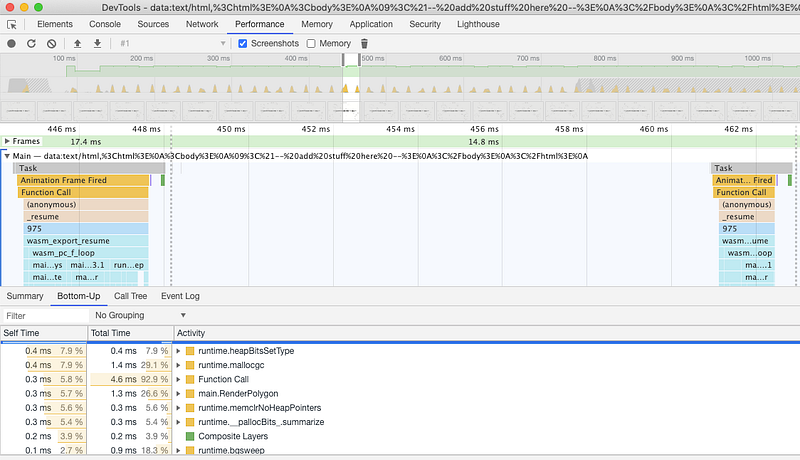 Chrome Performance Tools
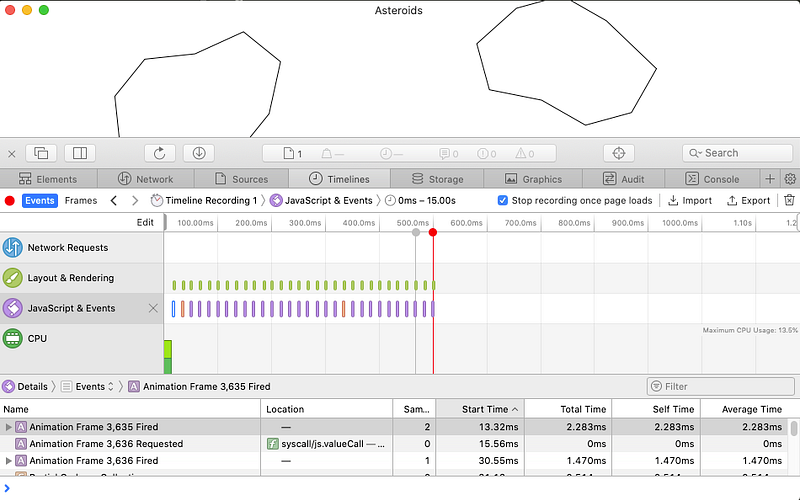 Safari tools for the webview
Both these tools show that Lorca and Webview render each frame in less than 3ms; there is no obvious performance difference between frameworks. This leaves around 14ms to spare, so not much need to optimize my vector or collision detection algorithms yet.
One difference between Lorca and Webview is that Lorca outputs fmt.Println’s to the terminal. This output is wrapped in JSON, so is hard to read, and it can be a performance problem. It is nice to see debug statements in the terminal like a normal app, so that I can pipe out JS logs and investigate after closing the window.
Distribution
To make it easier to distribute binaries for this game I needed to find a more elegant solution for picking between Lorca and Webview. Lorca will work on windows, linux, and is useful for development. Webview will only work on macOS, but has a nicer appearance.
To solve this I decided to use build constraints. These constraints allow me to implement a single method CreateDesktopApp, and based on the build GOOS, GOARCH and whether cgo is enabled, selects the best framework.
To do this first lets set up the BUILD.bazel file for asteroids:
# use lorca go_binary( name = "asteroids", embed = [":go_default_library"], visibility = ["//visibility:public"], goos = "darwin", goarch = "amd64", )``# use webview go_binary( name = "asteroids_darwin", embed = [":go_default_library"], visibility = ["//visibility:public"], goos = "darwin", goarch = "amd64", cgo = True, pure = "off", )``# use lorca go_binary( name = "asteroids_windows", embed = [":go_default_library"], visibility = ["//visibility:public"], goos = "windows", goarch = "amd64", )``# use lorca go_binary( name = "asteroids_linux", embed = [":go_default_library"], visibility = ["//visibility:public"], goos = "linux", goarch = "amd64", )
Here you can see that we have set up four binaries: darwin with and without cgo and pure, windows and linux.
Then we need to change the main function to look like:
func main() { config := &desktop.Config{...} desktop.CreateDesktopApp(config) }
This will now always call a single function to select the framework. The desktop package now has two files each implementing CreateDesktopApp:
webview.gowith the constraint// +build darwin,cgolorca.gowith the constraint// +build windows linux darwin,!cgo
[gazelle](https://github.com/bazelbuild/bazel-gazelle) will set up the correct imports for the different platforms, and go build will select the correct file (and framework) to use.
These binaries are uploaded here.
One final problem that I am not tackling in this post is that these binaries not signed or packaged in a way to make them easily runnable. I will leave that for another post.
Conclusion
As a test to build and distribute a reasonably complicated Golang desktop application this has been a success. I have a desktop application, I have tested it on macOS and windows, and both work as expected.
There is still more work to do:
- get more customization (icons, menus…) that work across platforms
- package the applications in an OS specific manner so they are trusted and execute easily
- decrease and the size of the binary, perhaps by using tinygo
The asteroids game is also fun.
References
I used a lot of resources to get this working, from using the WASM libraries in go, to rendering animations to canvas, to vector drawing tools, and the algorithms used in my implementation. Here are a few:
- https://jlongster.com/Making-Sprite-based-Games-with-Canvas
- https://codepen.io/anthonydugois/full/mewdyZ
- https://developer.mozilla.org/en-US/docs/Web/API/Canvas_API/Tutorial/Basic_animations
- https://stdiopt.github.io/gowasm-experiments/bouncy/ code at https://github.com/stdiopt/gowasm-experiments/blob/master/bouncy/main.go
- https://www.html5rocks.com/en/tutorials/speed/animations/
- https://github.com/bugra/matrix/blob/master/matrix.go
- https://github.com/grahamjenson/pathby/blob/master/lib/transformations.rb
- https://www.mathsisfun.com/algebra/matrix-determinant.html
- https://www.mathsisfun.com/algebra/matrix-inverse-minors-cofactors-adjugate.html
- https://stackoverflow.com/questions/471962/how-do-i-efficiently-determine-if-a-polygon-is-convex-non-convex-or-complex
- https://bell0bytes.eu/centroid-convex/
- https://github.com/jriecken/sat-js/blob/master/SAT.js