I got a new graphics card because I want to play around with some machine learning using tensorflow and pytorch. Before I jump into all those high level concepts, with layers and layers of abstractions, I want to understand a little bit more about CUDA and how it works. I usually learn by doing, so I decided to do something pretty easy, implement Game Of Life (GOL) using CUDA.
GOL is good use case for CUDA. It is a simple mathematical operation that can be massively parallelised. In this post I get a pretty fast implementation of GOL working in CUDA, and compare it against another implementation in Golang. **TLDR: CUDA wins… by a lot.**CUDA lets you compile code to be run on a graphics card. You write in a C like language two types of functions, one for the CPU (host) and one for graphics card (device). The code starts with a main function executed on the CPU and can call out to device kernel functions declared with __global__.
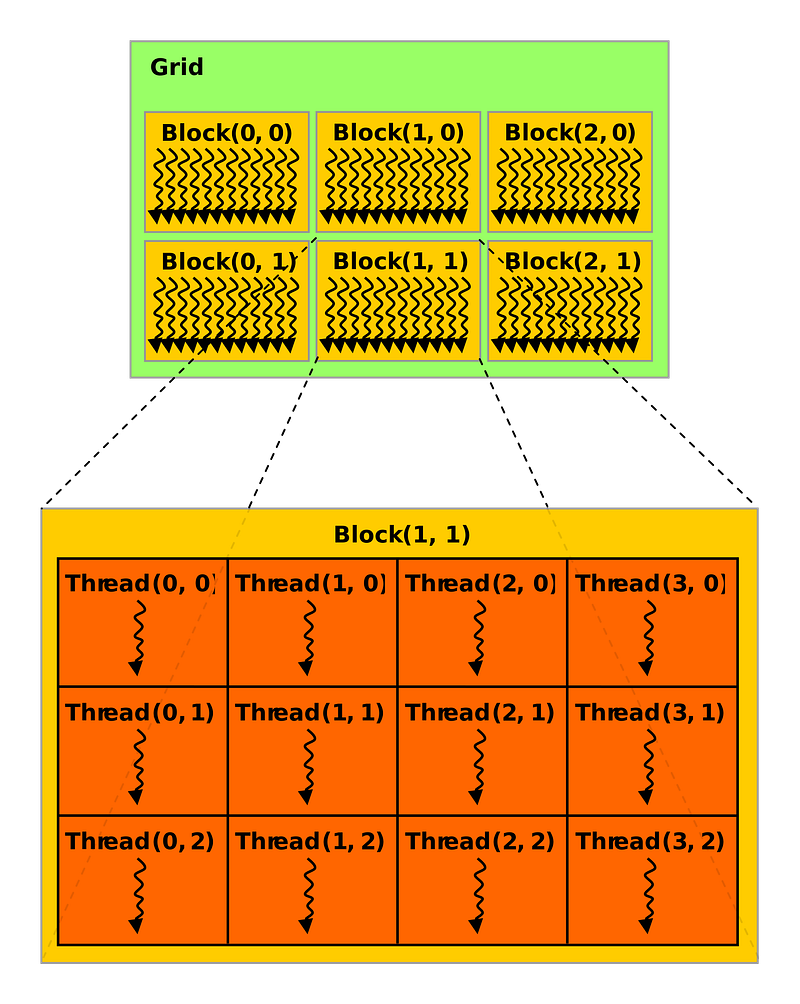
When you call a kernel function, it is run many times on the same set of arguments. The only difference between each execution is the assigned thread and block positions, each either in 1D, 2D or 3D space. This looks like:
 2D layout of threads and blocks from here
Read more about this execution model here.
A thread position can be a max of 1024 locations (e.g. in 2d space that would be 32x32 square), and a block position up to 65535³ (so, a lot of blocks). When a kernel is called the number of threads and blocks is defined before the function with <<<blocks, threads>>>, e.g. addVector<<<5,10>>>(), CUDA will then assign GPUs to execute these 5 blocks each with 10 threads.At this point I should say that I based most of this code off of “Conway’s Game of Life on GPU using CUDA”, an excellent article that you should read.
GOL maps really well to this execution model. Each cell can be calculated by a thread, and we divide the world up into 32x32 blocks of cells. To calculate x and y for each cell we use:
x = threadIdx.x + (blockDim.x * blockIdx.x); y = threadIdx.y + (blockDim.y * blockIdx.y);
threadIdx and blockIdx are the x and y position of the thread and block and blockDim is the total number of threads in a block dimension (here 32). So in thread (2,3) in block (4,5), x = 2 + (32 * 4) = 130 and y = 3 + (32 * 5) = 163.The last real complication of CUDA here is that you can only pass 1D arrays as arguments (kinda, I am not 100% sure, I am new to C). This means that once we have the x and y co-ordinates we need to map them onto a 1d array. The mapping I am using looks like [(x0,y0),...,(x31,y0),(x0,y1)...].
For all the calculations in GOL we first need to find the rows y-1, y, y+1. We already have y so now we need y-1 (or y_down)and y+1 (or y_up) and wrap around the world:
y_up = (y + 1) % size y_down = (y - 1 + size) % size
Then we can find where the offset for these rows in the array by multiplying by the world size:
y_offset = y * size y_up_offset = y_up * size y_down_offset = y_down * size
For example, if y=4 in a world size 32x32 then y_offset would be 4*32.
We then need the x_left and x_right values and their array offsets:
x_left = (x - 1 + size) % size x_right = (x + 1) % size offset = x + y_offset
Now we can inspect all cells around (x,y):
aliveCells = world[x_left + y_up_offset] + world[x + y_up_offset] + world[x_right + y_up_offset] + world[x_left + y_offset] + world[x_right + y_offset] + world[x_left + y_down_offset] + world[x + y_down_offset] + world[x_right + y_down_offset];
According to the GOL rules if the cell has 2 or 3 neighbours it survives, if it has 3 and is dead it becomes alive, anything else it dies.
buffer_world[offset] = aliveCells == 3 || (aliveCells == 2 && world[offset]) ? 1 : 0;
We assign the value into a different array called buffer_world, because all other threads are using the world for their calculations.
The kernel function arguments are then buffer_world, world and the world size (to calculate offset). The function then looks like:
__global__ void game_of_life_turn( ubyte *world, ubyte *buffer_world, short size )The size of the world will change the number of threads and blocks we need. To make it super simple we just require the number of threads to be 32,32 and the size of the world to be multiples of that. This makes it easy to divide the world into blocks:
dim3 threadsPerBlock(32, 32) uint blockDimSize = size / 32 dim3 numBlocks(blockDimSize, blockDimSize)
To then calculate a whole world we just run:
for (turn = 0; turn < turns; turn++) { game_of_life_turn<<<numBlocks, threadsPerBlock>>>( device_world, device_buffer_world, size ) std::swap(device_world, device_buffer_world) }
There is a bunch of boiler plate stuff I missed like cudaMalloc and cudaMemcpy. But basically this is a working GOL implementation in CUDA!I want to compare this CUDA implementation with something executed on the CPU and chose to do that in Golang. Now you may be asking
Graham, why are you comparing CUDA with GoLang rather than just plain C?
The answer is that the only reason I am writing C is because I want to learn me some CUDA. And, typically, if I wanted to write something in C, I would just write it in Go. Learning the parallelism model in C also looks like a pain.
To get the Go implementation I copied over the CUDA implementation and replaced the parallelism with goroutines. A goroutine per cell is a bit expensive, so we chunk the world up into the number of CPUs the system has and then execute each in parallel.
concurrency := runtime.NumCPU() for i := 0; i < turns; i++ { gameOfLifeWorldTurn(world, worldBuffer, size, concurrency) tmp := world world = worldBuffer worldBuffer = tmp }
With the goroutine call looking like:
func gameOfLifeWorldTurn(univ []int, buffer []int, size int, concurrency int) { var wg sync.WaitGroup wg.Add(concurrency) for job := 0; job < concurrency; job++ { go func(job int) { defer func() { wg.Done() }() x1 := job * (size / concurrency) x2 := (job + 1) * (size / concurrency) for x := x1; x < x2; x++ { for y := 0; y < size; y++ { gameOfLifeCellTurn(x, y, univ, buffer, size) } } }(job) } wg.Wait() }
gameOfLifeCellTurn is the same implementation as the CUDA function except it doesn’t need to calculate the x and y from the thread/block model.
Results
A good way to compare these implementations is in “millions of cells calculated per second”. Starting at a world size of 256x256 and incrementing by 256 each time, I ran each implementation for 10k turns. These are the results:
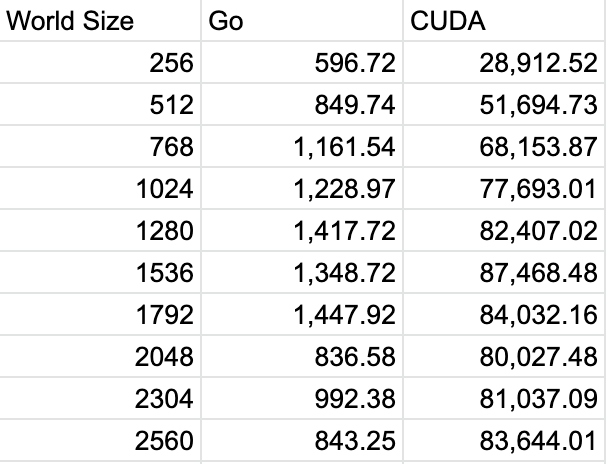
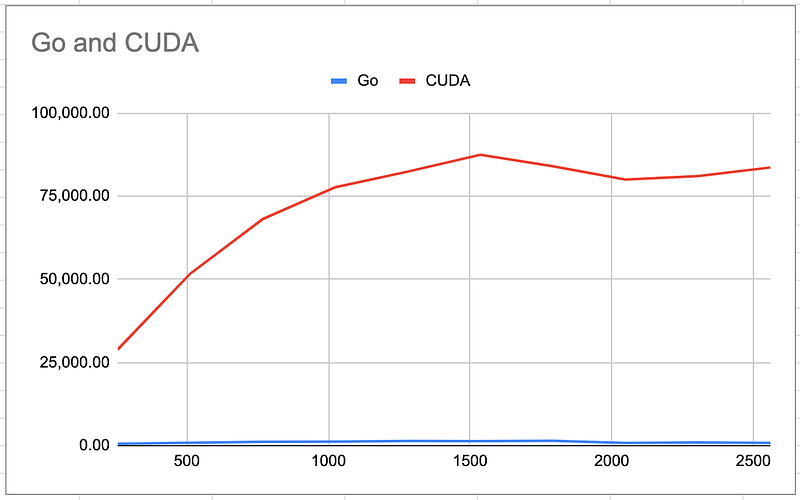
So Golang is hovering around 1billion cells per second being processed, where when CUDA really gets going is around the 80 billion mark.
In direct comparison with one another:
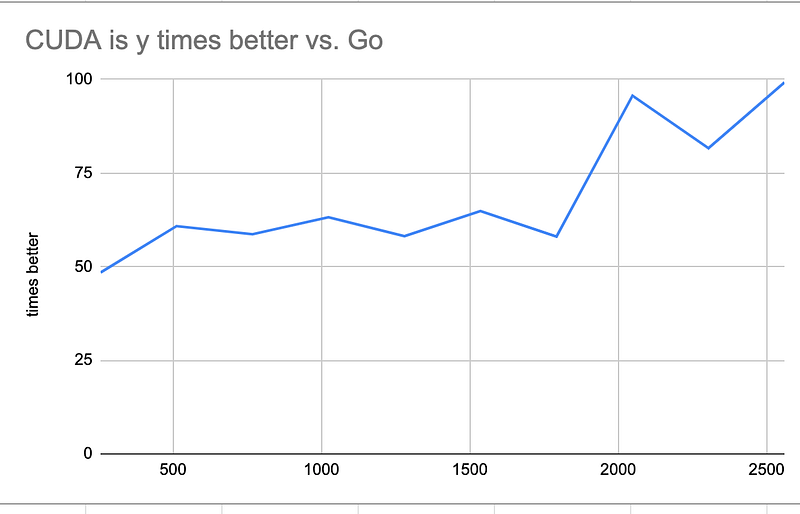
This shows that CUDA is 50 to 100 times faster than the Golang implementation. The CUDA implementation could even be further optimised by selecting better thread and block dimensions.CUDA is a beast. I think the programming model is intuitive, and pretty easy to pick up. The sharp edges are all in C with things like the pointers. I was always ending up in unallocated space and breaking everywhere.
Up next I want to see if I can soften some of those sharp edges by comparing the two implementations in this post to a Golang implementation that calls out to CUDA. This will hopefully mix the best of both worlds; CUDA speed with Golang for the easy implementation.All code is available here