This is the third post about my 2yo son’s Type 1 Diabetes (T1D). Previously, I wrote about his initial management coming out of the hospital, then his management with a Continuous Glucose Monitor (CGM). This post is about the last three months we have been using the Dana-i insulin pump with the CamAPS Hybrid-Closed-Loop (HCL) algorithm.
Obligatory: nothing here is medical advice.### Insulin Pump
The pump we chose was the Dana-i pump. I wrote about the reasons we picked that pump here, but basically the Dana-i is small, remotely controllable and can be used with the CamAPS hybrid-closed-loop.
On its own the Dana-i pump is still a pretty good pump. As well as a lot of the standard functionality (bolus calculator, basal rates, temporary basal…) it also can be remotely controlled from a phone via the AnyDana app:
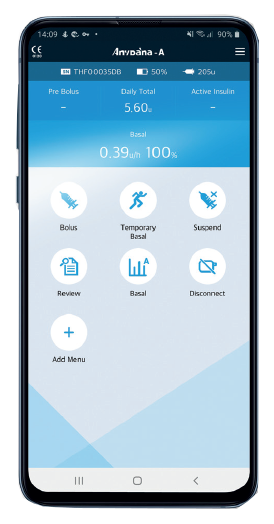 AnyDana-i app on iOS or Android
Note: you cannot use the AnyDana app and CamAPS at the same time.
Sam has been on this pump for about 3 months; here are some quick pros/cons we have noticed using a pump vs MDI.
Some Pros:
- Not as many needles (less stabbing). On MDI we injected Sam 8–10 times a day, now we change the infusion set once every 3 days.
- Remote bolus. We don’t have to catch him and hold him down to give insulin.
- Different basal rates can be set for every hour of the day and adjusted with temporary basal rates.
- Sam adapted quickly to having a pump strapped to him. We thought he would hate it, but after a few days he barely noticed it.
- More precise doses of insulin. On MDI we could only inject multiples of 0.5u at a time, on a pump we have 10x the resolution of 0.05u.
- We are more flexible with foods and times he eats. It is easy to give insulin, so we are less stressed about small snacks and new foods.
- Single insulin prescription. No more keeping track of basal insulin, bolus insulin and dilute insulin stocks.
A few Cons:
- Replacing his infusion set and refilling insulin is very stressful. It is a very finicky task that requires one parent to refill the pump while the other looks after a toddler.
- The type of site is situation dependent. We need a short, steel needle, so we can use two; Soft or Easy release. Soft release is harder to place but can be easily disconnected, great for swimming days. Easy release is easier to place, lower profile so less likely to get ripped off, but more difficult to disconnect, so is good for more playful activities like trampolines.
- You don’t see the insulin go in. With MDI you see the needle inject the dose, but with a pump you are never 100% sure. You get a new stress in your life after the first site failure resulting in a massive high.
- Pump belts suck on a 2yo. We use a great pump belt from a facebook store called Bizy Lizy pump belts. But it took trying a bunch of different belts to find the right one. It can’t be too tight or it will annoy him, too loose and it will bounce off while on a trampoline.
- Lots of insulin waste. Sam is small so about a days worth of insulin is just in his tubing. When doing a site change you throw out a lot of insulin.
- Cost. Pumps are crazy expensive. Dana-i was about $5,000NZD and about $2,000NZD for a year’s supplies.
There are some things that are really tradeoffs:
- More control/More decisions. You can do more, so now you think of all the little tweaks you can make to improve.
- T1D is more hidden/visible. With remote bolus we no longer have to hold Sam down, pull out a needle and jab him with an insulin pen. But, he does have to carry his pump around with him everywhere.
- We have to carry less on short outings, more on long trips. On a pump you don’t need to take much if you go for a few hours. On long trips though we need to take spare sites, emergency needles, more insulin, setter, refiller…
A CGM is basically all upside (except the cost), but using a pump is more complicated. The downsides are real and we sometimes do miss MDI, especially when we are worried a site might rip out while Sam is running around a playground.
 Sam with his Dexcom G6 and pump belt
The biggest bonus for a pump is that it can be controlled by a loop algorithm like CamAPS. So let’s talk about that.
CamAPS Hybrid-Closed-Loop
A closed-loop system is one where all insulin delivery is automated. A hybrid-closed-loop system is one where manual intervention is still required for food, but the basal (and to some extent corrections) are automated.
CamAPS is a hybrid-closed-loop. We still have to count carbs, work out our own carb ratios, and pre-bolus for meals. It does manage his basal insulin and can help gently correct him if he is going high.
Roman Hovorka, the main researcher behind CamAPS, is a mathematician who has been modelling how insulin works in patients since the 1980s [cite]. From the late 1990’s he has been building artificial pancreas algorithms with goals like improving outcomes and reducing stress for families managing T1D in young children [cite]. CamAPS development has now been going for nearly 2 decades and has a lot of clinical trials showing its value.
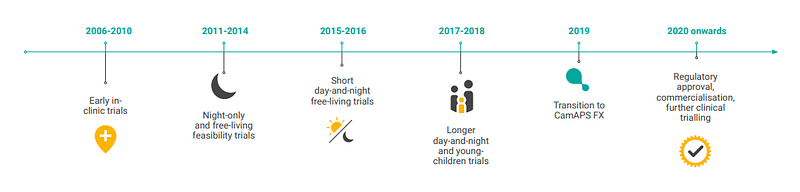 CamAPS development [source]
The CamAPS FX app contains the algorithm that connects to Dexcom G6 and the Dana pump, and controls everything:
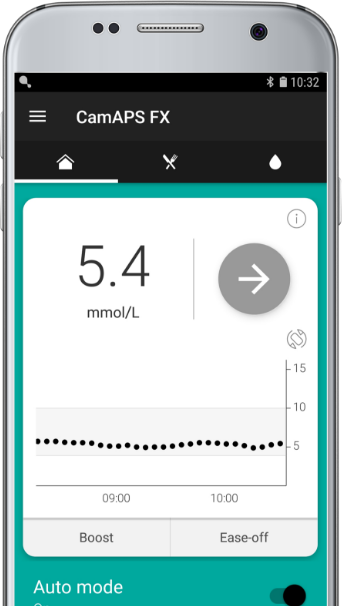 CamAPS FX app
The main features are:
- Auto-mode: which turns the algorithm on and off
- Boost and Ease-off: which turns the aggressiveness of the algorithm up or down
- Personalised Glucose Targets: Change the target blood glucose level the algorithm is targeting at different times during the day.
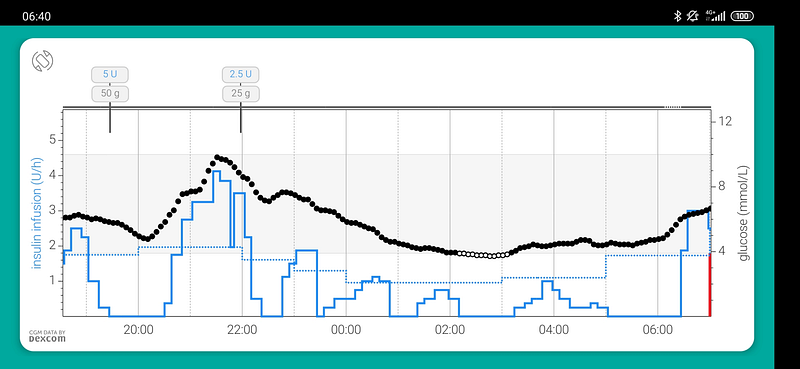
When auto-mode is on, CamAPS will adjust the basal rate to try to get your Blood Glucose Level (BGL) to the target glucose value. This looks like:
 [source]
The black dots are BGL values and the blue line is CamAPS adjusting the basal rate to compensate. It is really cool you can see the algorithm working.
CamAPS will learn:
- Your body’s response to insulin: the time to activation, peak activation and your insulin sensitivity factor (ISF) throughout the day.
- Your body’s response to carbs: To an extent it will ramp up basal to cover carbs that you have consumed but not bolused for.
- Your schedule: it covers things like the dawn effect which happen about the same time every day.
You still tell CamAPS:
- Carb ratios: CamAPS uses carb ratios you set on the pump.
- Glucose target: If you want to change the default 5.8 mmol/L.
- When to ease off or boost basal rates usually for exercise. You do not tell CamAPS how much to boost or ease off though like with temporary basal rates.
- Boluses for food: Still have to carb count and tell it how much you are eating.
- Un-bolused food: You need to tell CamAPS about carbs you don’t bolus for (e.g. hypo treatments) to make sure the algorithm has all the info needed to learn.
Although you still have to do a lot with CamAPS, you are removing a lot of basal work that can be complicated.How does CamAPS work?
CamAPS works_*_ by including many different models to predict things like BGL and ISF. At midnight each day, all the competing models are ranked according to how well they fit the last few days worth of data, and the models that fit that data best are used for the next day [cite].
This looks like a stacked generalisation (blended) approach which was most notably used to win the $1 million Netflix prize in 2009 [cite]. Given everyone has different insulin needs, this seems like a pretty good approach. For example, you could have different models to predict BGL for toddlers and pregnant women, then CamAPS can choose the model that best suites you without you having to be asked.
*: CamAPS is proprietary so this is just speculation based on public info. I cannot find the list of different models that are used by CamAPS or any more specific details about the algorithm. If you know anything more please point me in the right direction.
Using CamAPS
The first 10 days using CamAPS you are recommended to not turn on auto-mode, as it has to collect data for its models. The main problem during this time was that CamAPS does not have much functionality with auto-mode off, e.g. no temporary basal since boost and ease-off only work with auto-mode on.
After 10 days we turned on auto-mode. The first day it was weak, the second day it was super aggressive, the third day it was weak again. It was clearly still tuning the models, so we were not trusting CamAPS too much.
The second and third weeks were better. We were learning that CamAPS was not a silver bullet, and when we needed to intervene. We started to experiment a bit more with features like extended bolus, boost and ease-off.
Now after 3 months of an algorithm being in charge of Sam’s pancreas, here are some pros:
- Easy to use. CamAPS makes it hard to screw up. If I wake up drowsy at 2am to correct a high, CamAPS makes it difficult to accidentally give too much insulin.
- Fewer decisions. CamAPS decides all the basal rates, no help from us. We still do lots of work around meals and give large corrections when needed.
- No more dawn effect. None. CamAPS has been able to catch and correct the dawn effect almost every day for months.
- Trust is earned. We are getting more trusting with the algorithm. This results in us widening our alarms, meaning we get more sleep.
- Personal glucose targets are great. This is the main lever we pull when trying to get the algorithm to do what we want. At the moment we have set high targets during sleep and lower targets during the day.
A few Cons:
- First weeks are not good. You learn about CamAPS while CamAPS learns about you.
- No luck with extended meal bolus. There is a feature to have an extended meal bolus, but it has been useless for us. We end up just doing it manually.
- Still goes low and high overnight. The algorithm is not perfect, so there are nights where we have to intervene.
- Cost. CamAPS is a paid app and costs about $2,000NZD per year. Android APS is free. We chose CamAPS because of the amount of research on 1–5 year olds, but we are always considering other options (especially when AndroidAPS has features like SMS bolus).
Is CamAPS Better Than MDI?
With Multiple-Daily-Injections (MDI) and a Continuous Glucose Monitor (CGM) Sam had good numbers, HbA1c 6.6% and time-in-range (TIR) 76%. But MDI is a lot of work! We consider CamAPS a success if we:
- have the same or better HbA1c and TIR.
- get more sleep with fewer alarms and actions during the night.
- have more flexibility while making fewer decisions
TIR and GMI
Let’s look at the numbers:
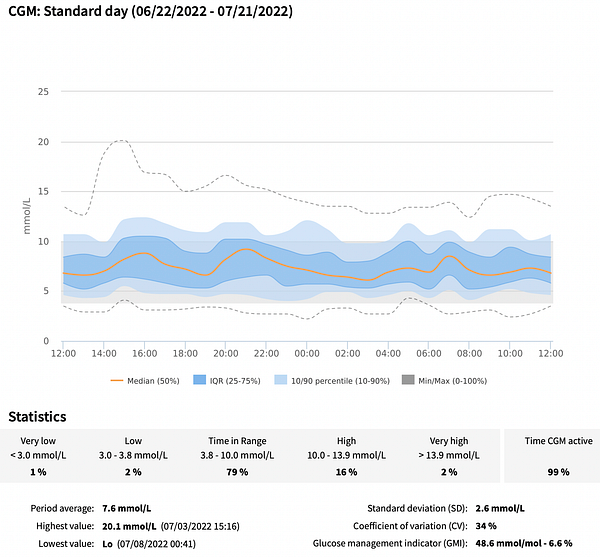
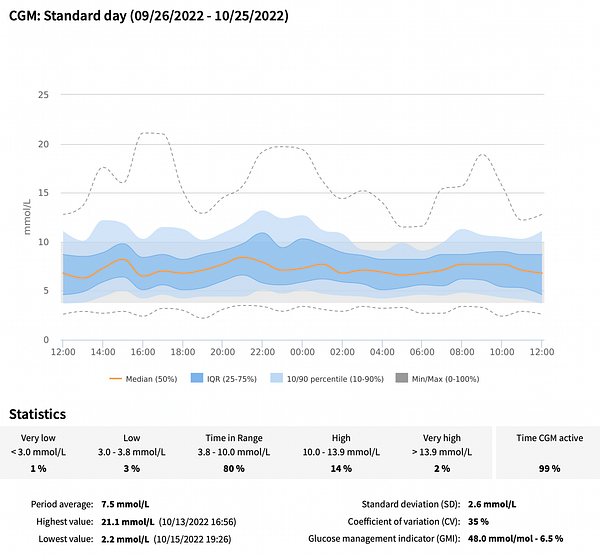 Left: AGP graph from last month on MDI. Right: AGP graph from the last month on CamAPS
You can see on CamAPS has completely removed the the dawn effect and post breakfast spike around 6am. The numbers are similar, but CamAPS is slightly better.
Getting Better Sleep
I wear a smart watch which tracks my sleep, let’s look at those numbers:
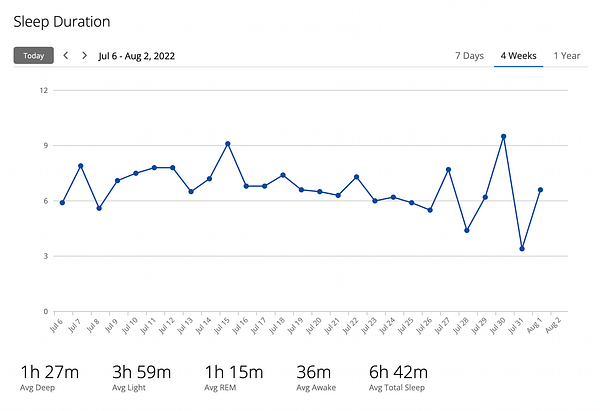
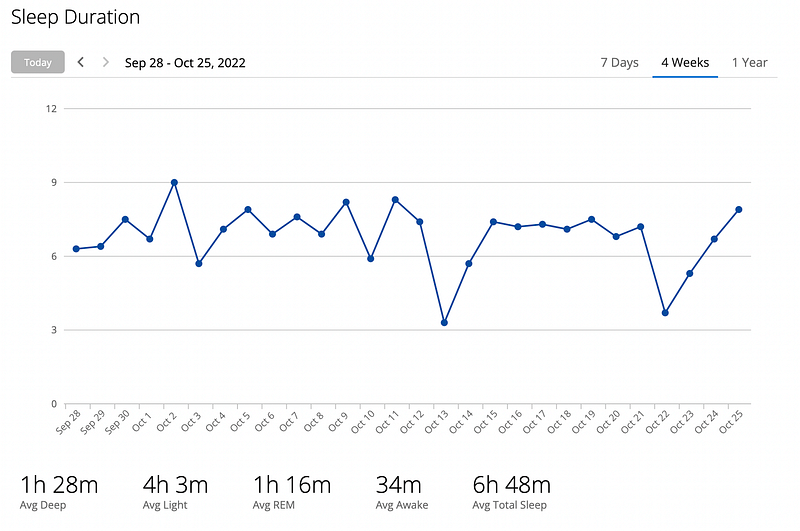 Left: Sleep graph from last month on MDI. Right: Sleep graph from the last month on CamAPS
This shows my average sleep is about the same with MDI and CamAPS, slightly won by CamAPS (again).
I also counted the number of times I had to wake up between 11pm–4am:
- MDI: 20 times
- CamAPS: 17 times.
Again a slight win to CamAPS.
Having More Flexibility and Making Fewer Decisions
For CamAPS to be better than MDI, I want to think less about T1D. I don’t know how to measure this so it has to be subjective.
With all the negatives that come with using Dana-i with CamAPS, the big win here is sometimes you can just trust the algorithm and let it take the reins (even for a just minute). This sometimes gives a necessary breather.
So I think a win for CamAPS here as well.
Is it a Success?
Is moving to CamAPS with a Dana-i pump from MDI worth it? I think it is.
CamAPS has given us a lot of small wins; slightly better TIR, slightly better sleep, slightly more flexible life. There are real drawbacks, so I am not sure every person would come to the same conclusion. Until something better comes along, Sam will continue having his pancreas replaced with CamAPS.I decided to tack on the end of this post the software setup we use with CamAPS.
Dexcom Follow and Xdrip
Even though promised in multiple locations [cite, cite], Dexcom follow integration with CamAPS has been delayed/postponed. This is a massive issue for many, because it provides a solid and customisable alerting system CamAPS is lacking.
Currently, CamAPSs notifications are:
- SMS only, requiring cell reception (which is dodgy at our house)
- Not configurable on followers’ phone. All the limits and timings are setup on his phone, so changing alerts (e.g. day vs. night) is annoying, and different followers can’t have different alert thresholds.
You can setup Dexcom Follow with CamAPS by using Xdrip. Xdrip can read the BGL from CamAPS if setup in “Companion mode” and then sends them to Dexcom.
This setup still has some problems, like:
- Xdrip (currently) doesn’t let you add or remove Dexcom followers. I had to work around that with curl
- Because of how Xdrip is working there are gaps in the BGL readings (especially if there is no change in reading).
- Installing and setting up Xdrip is difficult
CamAPS Sidekick
A few other issues I had with CamAPS:
- The phone falls asleep if CamAPS is open. When I am looking after Sam I usually prop up the phone so I can glance at his BGL. If the phone falls asleep I have to stop what I am doing to go check his BGL.
- It is difficult to find the exact timings of the active boluses and carbs. If you want to learn how insulin and carbs work, you need to know exact timings of when stuff happens.
- It doesn’t show the insulin-on-board from the basal. If I am going to manually correct Sam, I need to take into consideration how much the algorithm has been giving as well.
This is why I made CamAPSSidekick as a small app that talks to diasend to display his data (without sleeping) on his (or any) phone.
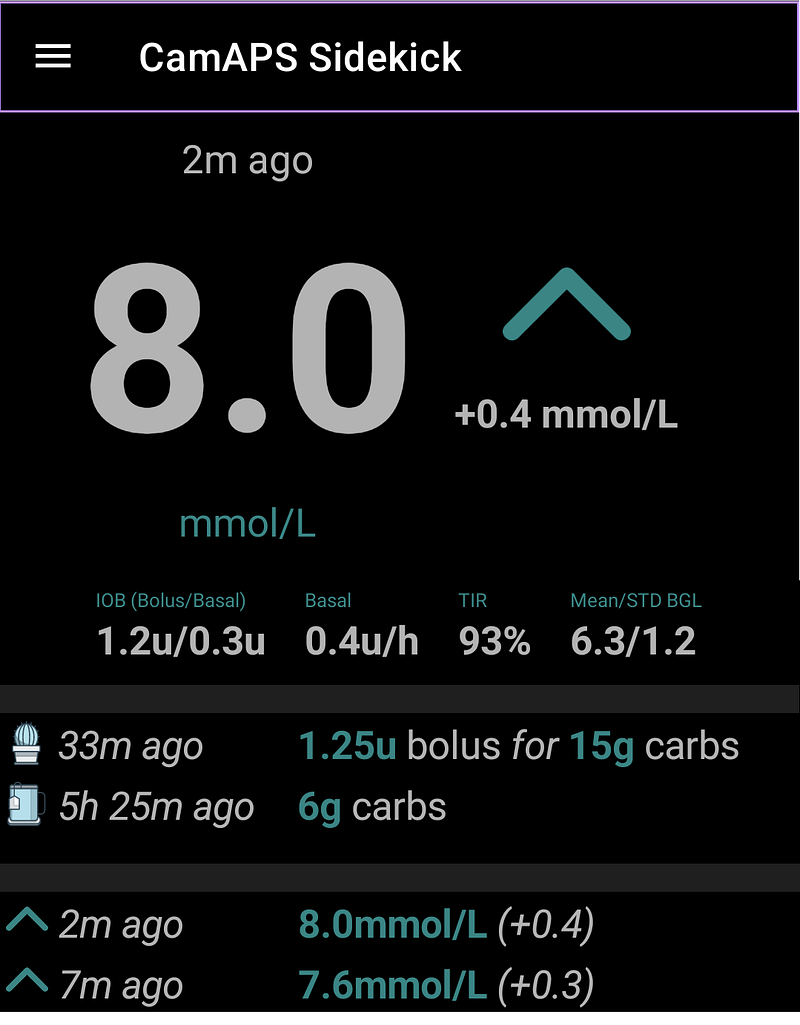 CamAPS Sidekick screen shot
CamAPSSideKick is now how we read the data from CamAPS, it makes things just a little easier. I also have it on an old phone next to my bed, so I can easily see his numbers during the night.
CamAPSSidekick is definitely not a polished app and it has a ton of features I want to add, but it has been useful for us. My next goal is to make it good enough that I think others can use it as well.
If you are interested in CamAPSSidekick please reach out, it will give me the motivation to keep improving it :)
Links
Posts about CamAPS you should read:
- BionicWookie posts about CamAPS “Another closed-loop” and “Mixing CamAPS with xDrip+”
- Diabettech posts about CamAPS [1][2][3][4]
Useful links:
- CamAPS Installation Guide [pdf]
- CamAPS Instruction Manual [pdf]
- CamAPS publications [zip file]
- Roman Hovorka talking about how CamAPS is actually implemented [video].
- Study from Interviews of Parents of young children [1–7] using CamAPS [link]
- Review of parents mental health looking after T1D children [cite]
- Interview with Roman Hovorka creator of CamAPS [link]
- Medical device manufacturing information; It can $30 million to launch a medical device, where only 10% of that spent on engineering costs