In this post I am going to discuss moving our Type 1 Diabetic (T1D) 3yo son Sam from CamAPS to AndroidAPS; Why we moved, the logistics of the the change, our current setup, and the results we are seeing.
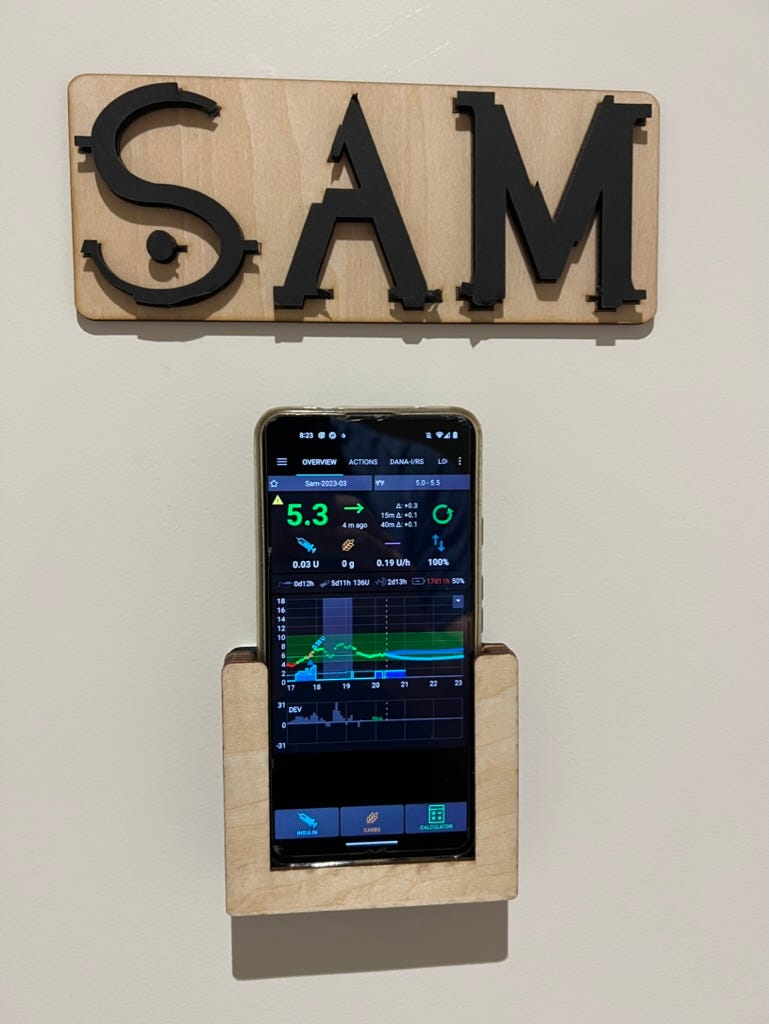 Sam’s Bedroom door with phone mount
Note: This is not medical advice or a recommendation, it is just our experience.#### Leaving CamAPS
To manage my sons Type 1 Diabetes (T1D) I need data. All the data I can get, and I need it to be accurate and timely. I need to know:
- when he gets insulin and how much.
- when he eats food and how many carbs it has.
- his current blood glucose and if its trending up or down.
CamAPS (the hybrid closed loop) uploads its data to Diasend, a portal for patients and clinicians to analyse diabetes data. Until a few months ago, CamAPS would upload data to Diasend every few minutes. After becoming overwhelmed with this data, I assume Diasend forced CamAPS to reduce that frequency of uploads to every few hours.
When Sam was on CamAPS, we used Diasend to share data and make decisions about treatments. Reducing the frequency of data being uploaded to Diasend (from minutes to hours) caused havoc for us, and within a few days we decided to move off of CamAPS.
Both CamAPS and Diasend are trying to fix this issue; CamAPS launched Companion, and Diasend users are moving to Glooko. Neither solve our issue.### AndroidAPS
We chose AndroidAPS because it works with Sam’s Dana-i pump and it has features we were really excited for:
- Dexcom G7 support with Xdrip, so we can upgrade to the latest CGM.
- Uploads data to Nightscout, so we can easily access live information.
- SMS bolusing, so we can bolus him from almost anywhere.
The worst thing about it (especially compared to CamAPS) is that it is a complex machine with a ton of settings. Understanding how it works, how to set it up, and how to move from CamAPS with minimal disruption took the better part of a month of research and planning.
A brief list of steps I took to migrate from CamAPS to AndroidAPS were:
- Get Nightscout Running: we chose to use t1pal because I didn’t want to run my own server. Then we synced Nightscout with Dexcom and Diasend (using this tool) to upload all of Sam’s data.
- Build and Install AndroidAPS on an old Android phone for testing and learning.
- Created an AndroidAPS profile with a guess at Sam’s settings.
- Go through the objectives. AndroidAPS forces you to achieve some goals before it unlocks some features. By doing these on the test phone, we can start Sam out with more knowledge and features.
- Tuning the profile using the online autotune tool. By tuning Sam’s AndroidAPS profile using the real data from Diasend and Dexcom we started out with more accurate settings.
- Setting up alerting and monitoring on our phones. We use both Dexcom follow and NightGuard (which I 100% recommend).
- Install apps on Sam’s phone. Install AndroidAPS, xdrip, and the Dexcom G7 app. Then we imported the tuned profile from the test phone onto Sam’s actual phone.
- Put G7 on Sam and connect**.** G7’s start to warmup as soon as they are applied. So this kicked off the final countdown to switch.
- Connect the pump to AndroidAPS, after disconnecting from CamAPS.
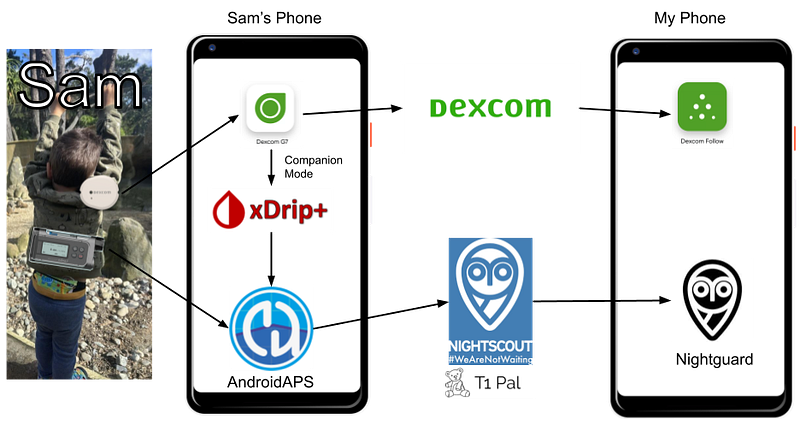
With AndroidAPS controlling the pump, receiving data from the G7 via xdrip, and everything being sent to Nightscout; the switch was complete.
Our final setup looked like:
First days on AndroidAPS
We started AndroidAPS on 3rd April 2023. To be safe we used the Low-Glucose-Suspend loop, which would turn off insulin delivery if low.
The first night on AndroidAPS he kept going high, so we changed some settings. The second night he kept going low, so we changed more settings. Then the third night was perfect!
You can see how impactful AndroidAPS has been by looking at my sleep:
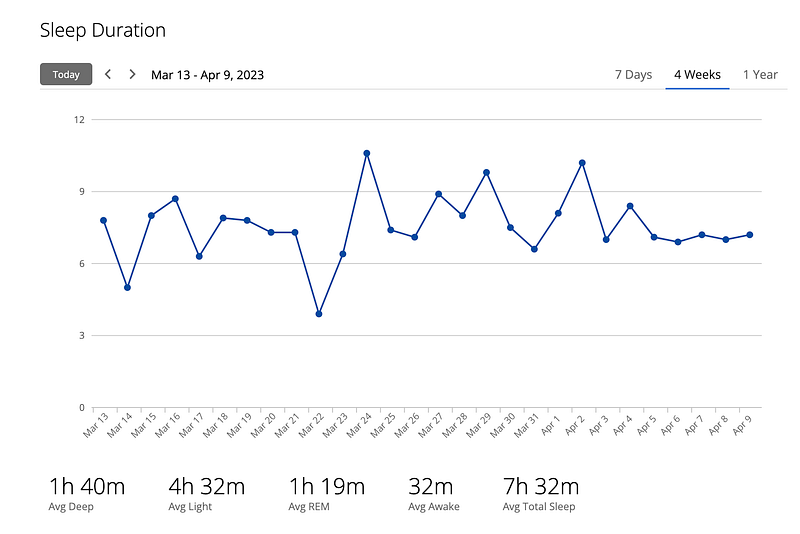 CamAPS sleeps (before April 3rd) is bad sleeps.
AndroidAPS kept working and letting me sleep throughout April:
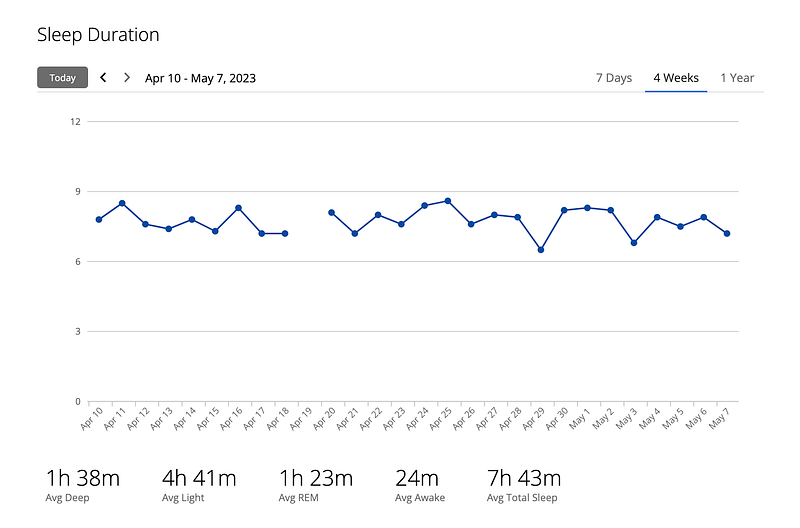 AndroidAPS sleeps
It is pretty rare that upgrading a phone app improves your sleep so dramatically.
Stats of CamAPS vs AndroidAPS
Sam’s nights (and my sleeps) are better which we can see in Sam’s glucose percentile graphs when comparing CamAPS (March) to AndroidAPS (May):
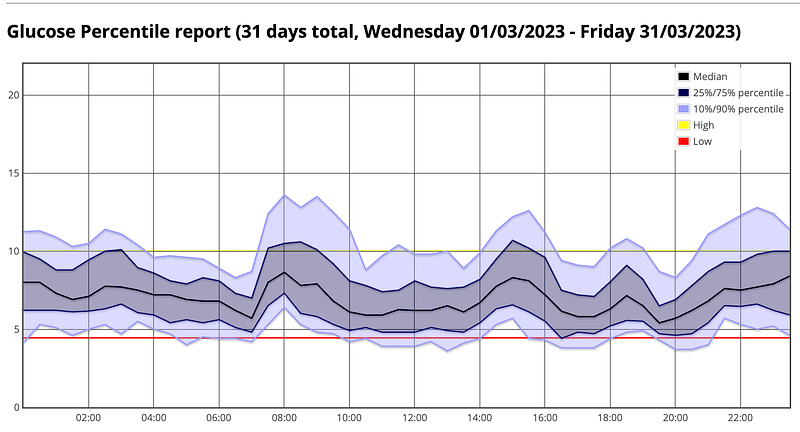 BGL percentiles using CamAPS (March 2023)
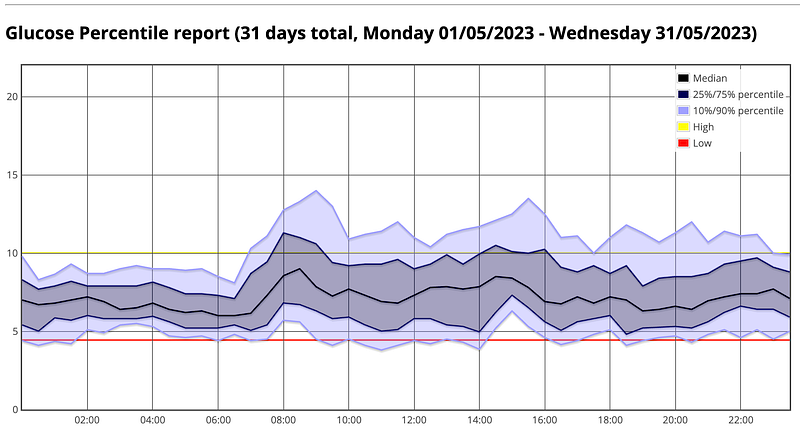 BGL percentiles using AndroidAPS (May 2023)
The difference in Sam’s glucose levels from midnight to 6am (when Sam wakes up) are stark. However, throughout the day you can see that AndroidAPS does seem to be a bit higher. This can be seen in the overall statistics comparing CamAPS (March) to AndroidAPS (May):
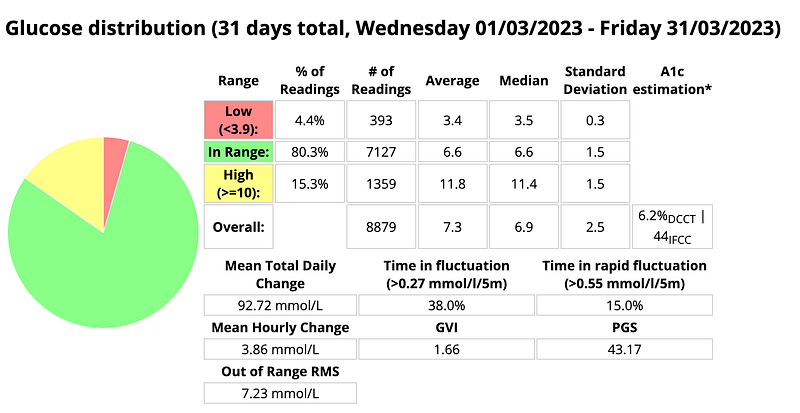 CamAPS March Statistics
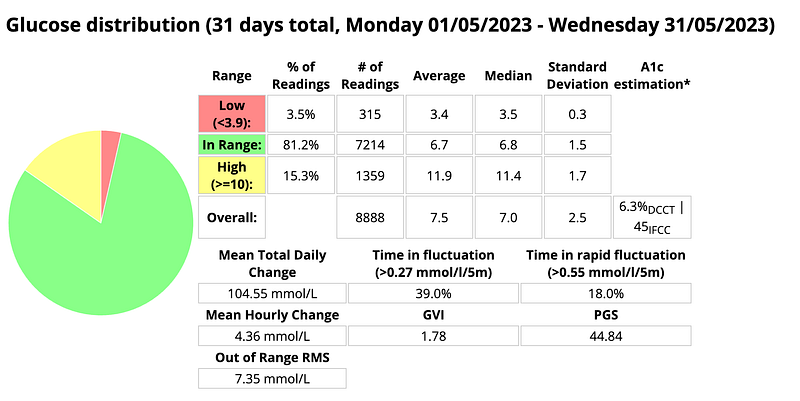 AndroidAPS May 2023 Statistics
AndroidAPS has less lows (4.4% to 3.5%) and more time in range (80.3% to 81.2%), but has a higher overall average (7.3 to 7.5mmol/L). Other than that CamAPS and AndroidAPS have very similar numbers.
We are still new to AndroidAPS, so we are still tweaking and learning. I am happy with these numbers, but I am hoping we can further improve them.
Problems
AndroidAPS (with xdrip and Nightscout) has a steep learning curve and requires a lot of technical know-how. Here are some issues that we found:
- Xdrip companion mode had some issues. I posted a discussion (here) on GitHub and got the issue sorted using an undocumented solution.
- To get through some of the objectives and questions I had to actually dive into the source code of AndroidAPS.
- The Nightscout server in T1D pal went down, and I had to use a workaround (adding and removing a plugin) to restart it.
The technical ability of the user to debug and fix issues comes with using an unsupported open source product. The communities online are willing to help and are amazing, and I cannot thank the maintainers of these projects enough.
A lot of the Dexcom G7’s have had issues, like accuracy, not lasting 10 days, to just straight out failing on insertion. The features, size and convenience are great, so we are hoping Dexcom is working to fix these issues as new batches roll out, otherwise we will have to change to G6 or Libre 3.
Conclusion
AndroidAPS is great but has a steep learning curve. We are getting good numbers, and much better sleeps but there is room to improve. Nightscout, SMS bolusing, SMB and other features are making life much easier. There is still a lot more to learn and work to do.We just started Sam on Omnipod Dash with AndroidAPS and it is going really well. Will write about that in my next post.