Managing my 5yo son’s Type 1 Diabetes (T1D) at night is a lot like being on call as a software engineer. Both are absolute shite. Waking up to alarms at all hours, trying to fix something to only make it worse, not understanding why anything is happening, alarm fatigue, lost sleep, burnout, and the constant stress you will sleep through an emergency.
It is a bit guff to compare the two. Though, there are a some things that do apply to both, like good tools can reduce the burden.
So I built an app called “Carer” to simplify decision making and reduce alarm fatigue. This post is about building Carer and about the thinking that went into it. This post is not healthcare advice.
Who is Carer for?
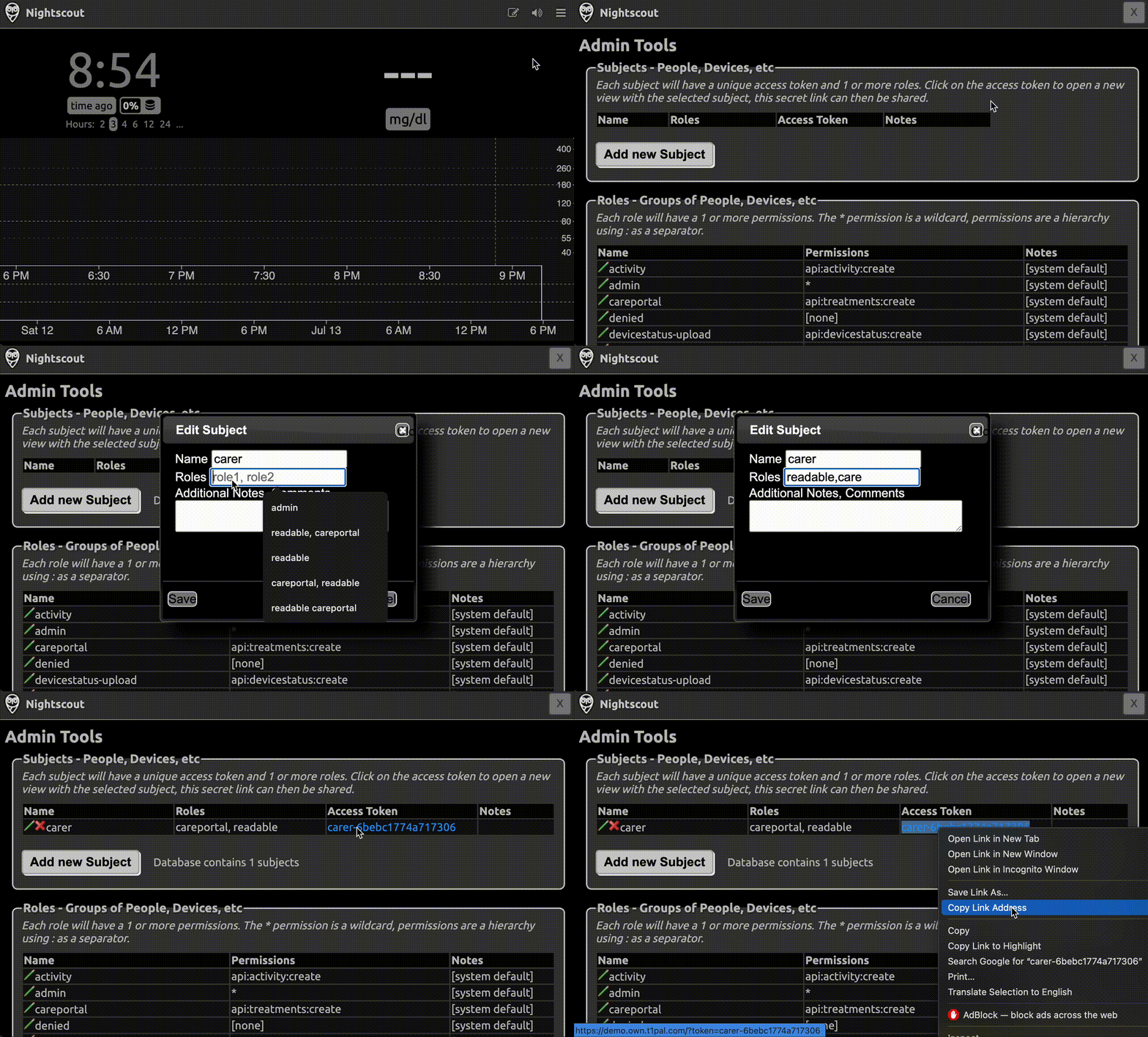
Carer is an app that displays information and triggers alarms based on data from a Nightscout instance. Nightscout is an open-source, self-hosted individual repository of T1D data that has wide adoption in the DIY diabetes community for monitoring and remote care.
Carer can also send information to Nightscout, like consumed carbs or temporary targets. This information is synced down to the artificial pancreas system (APS), like AndroidAPS, to make decisions about insulin delivery.
If you use Nightscout, and especially AndroidAPS, Carer is for you. Carer is available on iOS, macOS and Android (15+). It is free forever with no ads.


The Basic T1D Management Loop
To understand why Carer exists, you must know the basics of being on call for T1D. The main goal is keeping Blood Glucose Level (BGL) between 4–10 mmol/L by:
- Giving Carbs (e.g. gummy bears) to make BGL go up in 20–30mins.
- Giving Insulin to make BGL go down in 20–60 mins.
The time it takes for insulin and carbs to take effect is imprecise and can affect BGL for many hours.
Using these two levers to achieve stable blood sugars results in the T1D management loop:
- Look at Blood Glucose Level (BGL) every 5 minutes, which is the frequency of BGL readings from a continuous glucose monitor (CGM).
- If Low (< 4) or going low: Give carbs
- If High (> 10**)** or going high: Give insulin
- Wait 20–60 mins for carbs or insulin to take effect
- GOTO 1
This loop is a balancing act between insulin and carbs 24/7, sleep is not a respite. This is a pretty basic description of a complicated process, but it gives a good starting point for designing an app.
Basic App Requirements
To implement a tool to help with the above loop, it would need to show:
- BGL so that is easily readable.
- BGL trend up/down both as a diff between the last two readings and as a longer trend, to help predict highs or lows.
- History of carbs and insulin to calm nerves when waiting and to stop any double dosing.
- Information that affects decision making like insulin and carbs on board.
- Time since last reading so you know when the next reading will be.
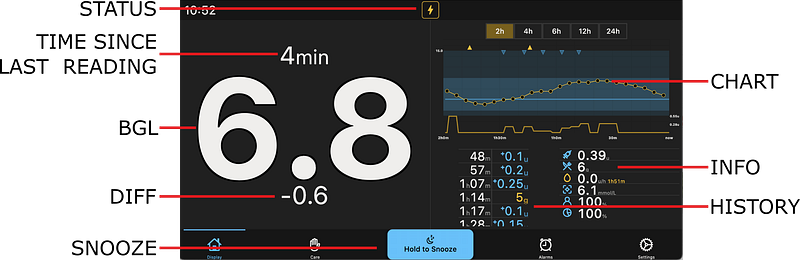
Making this information available by turning the phone into an always-on display will make checking BGL every 5 minutes much less disruptive. At night this display should dim as low as possible while still being legible as studies [1][2] show that light at night may be detrimental to health.
The app should alarm so that you don’t have to focus on the numbers during the day and so that you wake up when asleep:
- Alarm the user when high, low, urgent high, urgent low, fast drop and fast rise.
- Alarm when no BGL data have been received for a time. This is a catch-all alarm indicating a lot of problems.
- An alarms sound should be an increasingly loud noise and there should be a bright flashing screen so as not to wake the whole house.
- Ability to snooze Alarms when waiting for carbs or insulin to work.
- Predictions of BGL can be used to implement predicted low alarm and smart-snooze when predicted to soon be in range.
- Customisations for all alarms and alerts should be available, as each person manages their T1D differently.
Adding carbs and insulin is tricky. In the future we may be able to raise blood glucose remotely using a dual hormone pump, but these are unavailable at the moment. Giving insulin remotely is possible, but very dangerous, so instead you will have to use other methods for this. What the app can do is adjust the APS algorithm by:
- Writing down given carbs that will increase insulin delivery.
- Changing the target BGL that will increase or decrease insulin based on target and current BGL.
- Swapping to a preset profile, which changes the settings that the APS algorithm uses to calculate dosage.
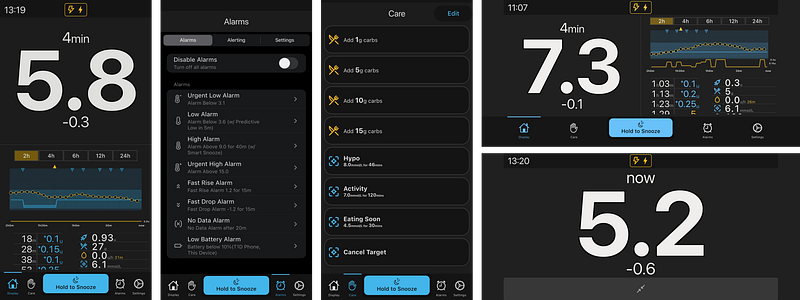 Carer Screens for Display, Alarms, and Care
Experience to Features
When I started using Carer I was always on the lookout for how to make it better. Here are a few examples of features that came from something going wrong:
- One night our son unplugged his phone’s charging chord, so his phone slowly ran out of battery overnight. Eventually it turned off, shutting down and causing a no data alarm after 20 minutes. Carer shows if his phone isn’t charging, and alarms if it gets to a low battery.
- On a few occasions I have woken up to an alarm that I had zero recollection of snoozing. Apparently, I had learnt to snooze an alarm in my sleep. Carer forces the snooze button to be a long press, making it just annoying enough to wake up a little bit.
- I woke up to a low alarm, gave carbs then snoozed the alarm. The low turned into an urgent low and my son needed more carbs, but the alarms were snoozed and I was asleep. Carer will wake up from a snooze if a low turns into an urgent low.
- Once I gave too much insulin, then snoozed for too long. My sons BGL dropped until he was low 30 minutes later. It was snoozed so it didn’t alarm for the low. Carer will turn snooze off if not alarming for 20mins.
- Every 3 days Sam needs his Omnipod insulin pump replaced. One day we forgot and only realised after he had fallen asleep. Carer shows upcoming changes for pumps (every 3 days) and CGMs (every 10 days).
- Fell asleep with notifications silenced: Show when notifications are turned off
- Fell asleep with volume down: Alarms override system volume
- Misclicked buttons: Better UI and UX
- Phone was locked but still want to be notified of alarms: Use background task to notify of alarms (only runs at most every 15 mins, so is not reliable)
As I added each one of these features, I was able to relax a bit more as something that was stressful and that I had to have in the back of my mind all the time was resolved.
Technical Details
Here are a few of the technical details of Carer’s implementation:
- I implemented Carer in Flutter, because I wanted a cross platform app and did not feel like going back down into the JavaScript depths again with React Native. Their is virtually no difference in the various platforms code. Flutter is great.
- Carer’s (non-private) data is stored using SQFLite. Using SQL like a web app made it feel like home, especially with testing.
- I use the Signals library for state management. I found it much more intuitive to understand than other competing libraries like Bloc.
- I started building Carer in Jan-2024. Started using it in June-2024 (with backup phone running Nightguard). Started using it exclusively November-2024. Beta testers in April-2025. Published in July-2025. It has taken a while.
- I still use Dexcom’s Follow app for push notifications, and NightGuard for widgets and watch integrations. I hope in future versions to implement these features within Carer.
- Carer does not have its own backend server using individual Nightscout instances. This makes development harder because Nightscout has pretty big differences in formats and data types based on integrations and versions. Having no server to manage does mean I could write Carer without worry about hosting and costs.
What is Next?
There are a few features I would like to add to Carer:
- Support for more non-audio alarms. Sugar Pixel supports a vibrating puck (e.g. this) like those used as hearing impaired alarms. Having Carer support this would make alarms much less intrusive.
- Push notifications. At the moment, alarms only work when the app is open, and local notifications are not reliable. Push notifications would require a server with user data, which is a lot of work to build securely.
- Open Source? At the moment I see little benefit of open sourcing this, only downsides. However, if you want to work on this with me I am more than happy to share the source code directly.
- Better prediction algorithm. I have already written about the limitations of Carer’s prediction algorithm. Getting a solid prediction algorithm would be good, but it is very difficult to do well.
- Integration with other Nightscout tools like auto-tune.
- Support for other languages (i18n) and accessibility (a11y) features would make Carer available to many more people.
Similar Apps/Devices:
Carer is not unique and has borrowed many ideas from other great tools.
- NightGuard is probably the tool Carer is most similar to. I still use NightGuard for my watch and widget displays.
- We also use a sugar-pixel, a custom piece of hardware that is more like an retro-alarm-clock. We do not use it for alarms but as a display beneath our TV to easily see numbers.
- I use, but dislike, Dexcom Follow. It is only useful for push notifications which sometimes do alert me to an issue.
- I have used APSClient as a remote control but is difficult to use and explain.
Here are more apps like Carer that I have not used:
If one of these tools suites you better than Carer that is awesome. Managing T1D is hard and you deserve help.Thanks to my wife for being the first user; Diego for helping me clean up the UX, beta testers for finding so many issues.FYI: A video showing how to get a Nightscout Token for use with Carer